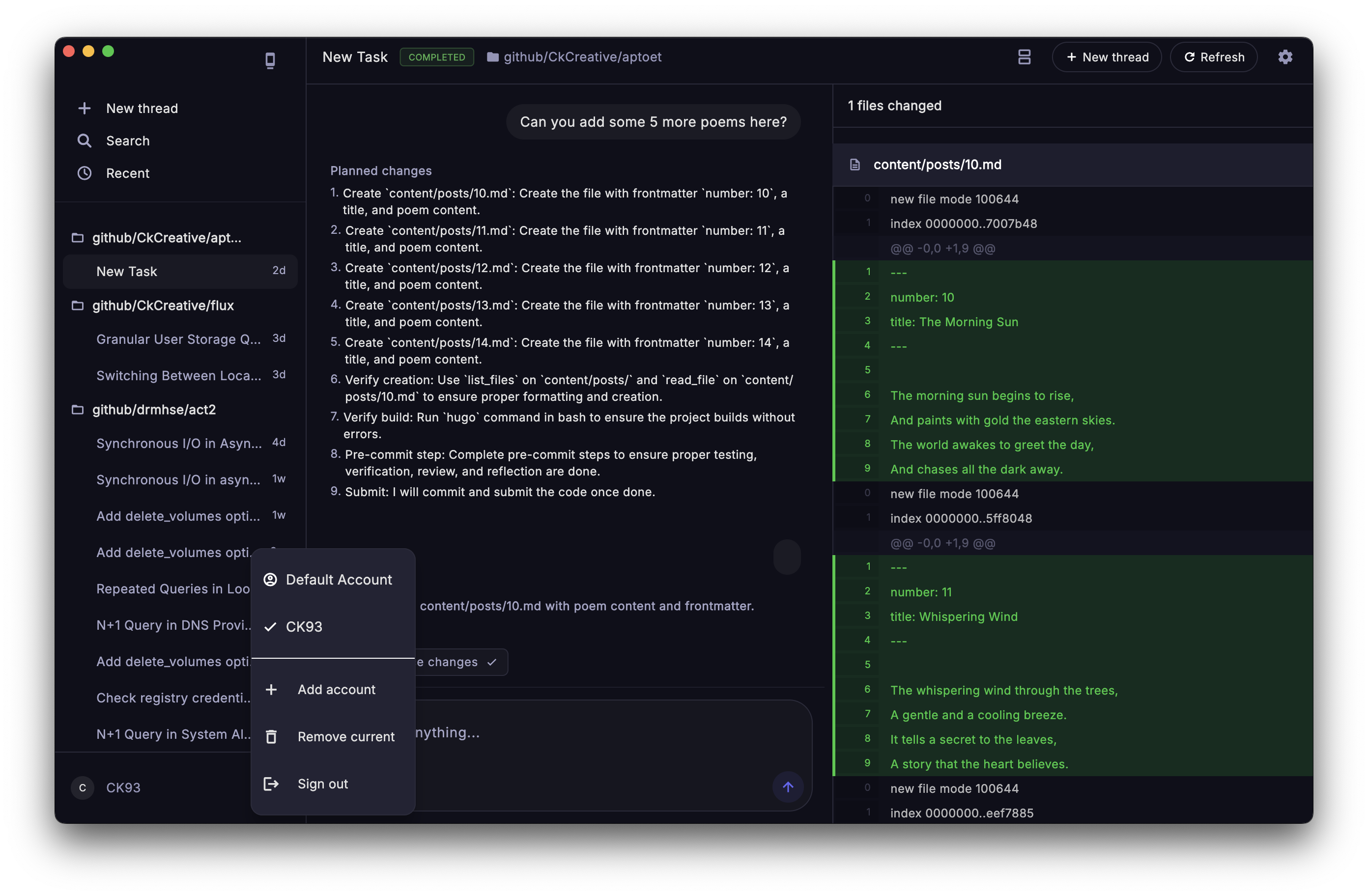
AI coding agents have outgrown the chat box.
They can plan, edit repositories, ask for approval, report progress, and hand back patches. Conversation is the wrong container for that work.
And work needs a review desk.
The cramped chat window made sense when agents were toys. It makes less sense when an agent is touching real files in a real repo. You need session history, account boundaries, progress state, approval controls, and diffs beside the conversation.
That is why I built a native Flutter desktop client for Jules. Jules already had the backend primitives: sessions, plans, approvals, repository context, progress updates, and generated changes. The missing piece was a product surface that respected the workflow.
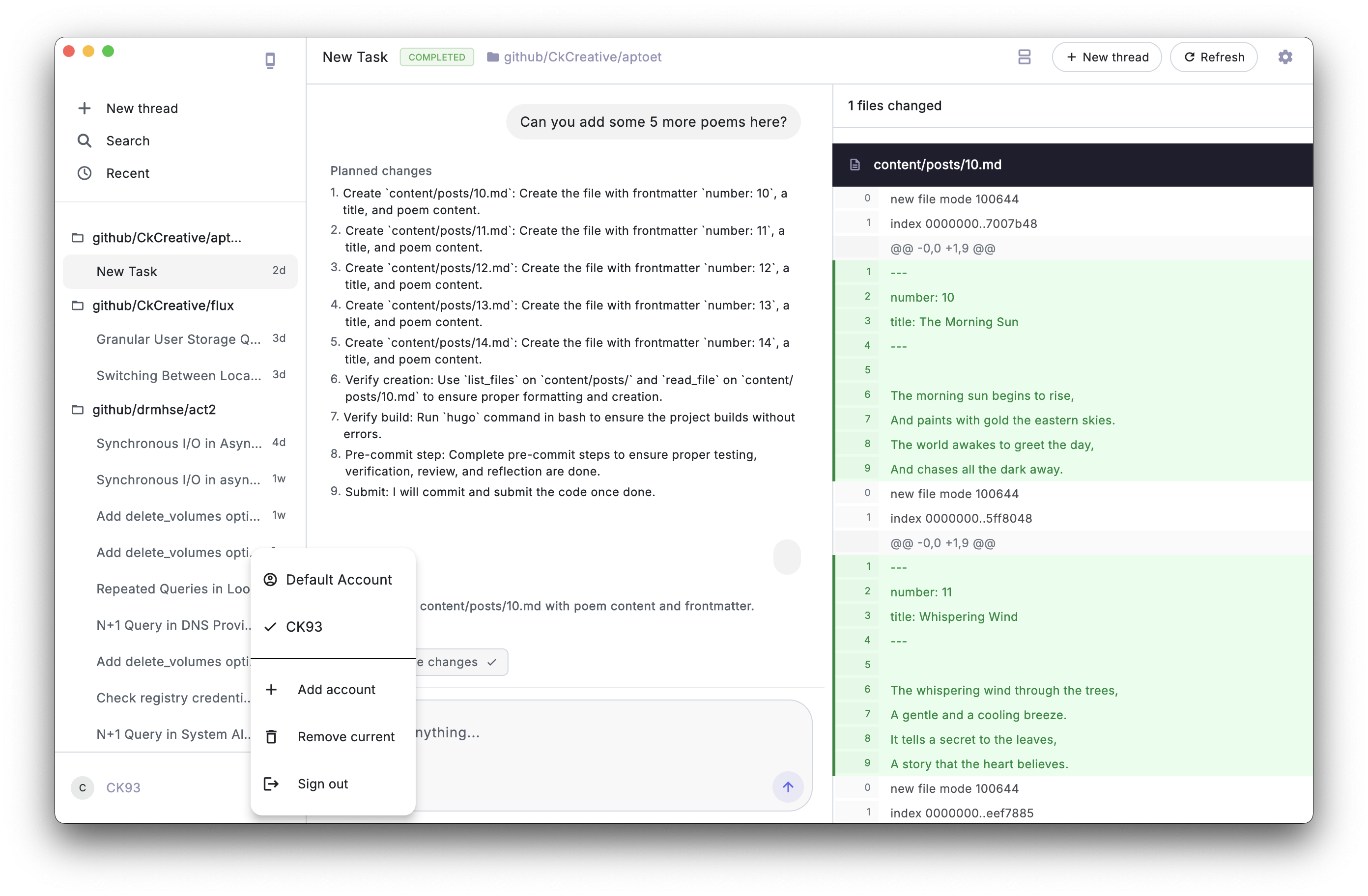
The First Release Had One Job
The first useful release had one job: protect the review loop.
That meant three things had to work well:
- Separate workspaces: Add multiple Jules API accounts, switch between them, and never leak cached sessions across account boundaries.
- Recoverable context: Browse sessions by repository, search history, load cached work first, and keep the screen useful when the network drops.
- Primary-screen review: Read the agent timeline, approve plans, send follow-ups, and inspect generated diffs without leaving the workflow.
That is the minimum shape of the product.
The app does not treat the API as a random set of buttons. It wraps the API in a repository, scopes cached data by account, loads local state before remote state, and keeps the UI responsive while background indexing fills in the rest.
That is the difference between a demo and a tool.
Keep the Architecture Boring
The app is intentionally boring in the best way:
Flutter UI
  -> Provider state
    -> JulesRepository
      -> ApiClient for remote calls
      -> LocalStorageService for Hive cache
The UI knows about sessions, activities, loading states, selected panes, and settings. It does not know how to build API URLs or how Hive keys are scoped.
The repository is the boundary:
class JulesRepository {
  final ApiClient _apiClient;
  final LocalStorageService _local;
  final String accountId;

  JulesRepository(this._apiClient, this._local, {required this.accountId});
}
That accountId looks small. It is not.
If a developer connects a work account and a personal account, the client must never blend those histories together. A cached session from one account should not appear while another account is active. API keys should feel like separate workspaces, not just separate strings in a settings screen.
So the local storage layer scopes keys:
String _scopedKey(String key, String? accountId) {
  if (accountId == null || accountId.isEmpty) return key;
  return '$accountId::$key';
}
That tiny convention turns Hive from a global bucket into an account-aware cache. Small boundaries prevent embarrassing product bugs.
Pattern 1: The Cache Makes It Useful
Fast apps cheat responsibly.
They show what they already know before they ask the network for what changed.
In this client, session loading starts with local data:
_sessions = await repo.getSessions();
_restoreCurrentSessionFromList(
  allowDefaultSelection: !_hasUserSelectedView,
);
notifyListeners();
Then the remote sync runs:
_isSyncing = true;
notifyListeners();

final response = await repo.syncSessions(pageSize: 100);
_sessions = _mergeSessions(_sessions, response.sessions);
That sequence matters.
If the user opens the app on a slow connection, they still get a useful screen quickly. If the API returns newer sessions, the provider merges them into the list. If the device is offline, the cached history still explains what happened last time.
The rule is simple:
The cache makes the app useful. The network makes it current.
Do not reverse those roles.
Pattern 2: Hide the API Behind Product Actions
The Jules API surface the app needs is compact:
Future<SessionsResponse> syncSessions({int pageSize = 100});
Future<List<Activity>> syncSessionActivities(String sessionId);
Future<SourcesResponse> syncSources({int pageSize = 100});
Future<Session> createSession(String prompt, String title, String repo);
Future<void> sendMessage(String sessionId, String prompt);
Future<void> approvePlan(String sessionId);
That is enough to build the entire workflow:
- Load sources so the user can choose a repository.
- Create a session with a prompt and source context.
- Poll the selected session for state and activity updates.
- Render the timeline as activities arrive.
- Send follow-up messages when the user needs to steer the work.
- Approve the plan when Jules waits for the human.
- Show change sets when artifacts include patches.
The app does not sprinkle raw endpoint strings across widgets. The UI asks the provider to perform product actions. The provider asks the repository to perform Jules actions. The repository asks the API client to perform HTTP actions.
That layering is not academic tidiness. It keeps every button from becoming a network integration.
Pattern 3: Model Agent Work as a Timeline, Not a Chat Log
Most agent UIs start as chat UIs. That is fine for a prototype, but code work has more structure than conversation.
A Jules session can contain:
- User messages.
- Agent messages.
- Generated plans.
- Progress updates.
- Artifacts.
- Change sets.
- State transitions such as planning, awaiting approval, in progress, completed, or failed.
The data model reflects that:
class Activity {
  final ActivityOriginator originator;
  final String? description;
  final Plan? planGenerated;
  final String? userMessage;
  final String? agentMessage;
  final ProgressUpdate? progressUpdated;
  final List<Artifact> artifacts;
}
That makes the UI more honest.
Plans, progress updates, prompts, and patches belong to different parts of the work loop. Treating them as typed objects lets the app render them differently and let the user respond to them differently.
This is one of the easiest ways to improve an AI product: stop flattening work into a transcript.
Pattern 4: Put Code Review Beside the Conversation
The product release feature I care about most is the diff panel.
When Jules produces code changes, the app finds the latest activity with change sets and renders the patch beside the conversation:
final codeActivities = session?.activities
    .where((a) => a.artifacts.any((art) => art.changeSet != null))
    .toList() ?? [];

final changeSets = codeActivities.isEmpty
    ? []
    : codeActivities.last.artifacts
        .where((art) => art.changeSet != null)
        .map((art) => art.changeSet!)
        .toList();
This is a small decision with a large workflow impact.
If the patch is hidden in a separate page, the user has to keep switching contexts:
What did I ask for?
What did the agent say?
What file changed?
Does the diff match the plan?
Do I need to reply?
Putting the diff beside the timeline keeps the review loop intact. The user can read the agent’s reasoning, inspect the files, and send a correction without losing the thread.
The first renderer is deliberately practical. It parses unified diff lines, tracks old and new line numbers, and styles added and removed lines:
if (line.startsWith('@@')) {
  final match = RegExp(r'@@ -(\d+),?\d* \+(\d+),?\d* @@').firstMatch(line);
  oldLine = int.parse(match.group(1)!);
  newLine = int.parse(match.group(2)!);
} else if (line.startsWith('+')) {
  result.add(_ParsedLine(line.substring(1), _LineType.added, '+', null, newLine));
  newLine++;
} else if (line.startsWith('-')) {
  result.add(_ParsedLine(line.substring(1), _LineType.removed, '-', oldLine, null));
  oldLine++;
}
The parser can get more complete later. The product lesson is already clear:
Agent output becomes more trustworthy when code review is part of the primary screen.
Pattern 5: Design for Desktop Work First
The desktop layout uses three surfaces:
Sidebar | Chat timeline | Diff panel
That is the ideal shape for agent work. The session list stays visible. The conversation remains central. The generated code sits at the edge where a developer expects review material.
But the Flutter app also needs to behave on smaller screens. The home screen calculates breakpoints and adapts:
final width = MediaQuery.of(context).size.width;
final isMobile = width < AppConstants.mobileBreakpoint;
final isTablet = width < AppConstants.tabletBreakpoint;
On mobile, the session list moves into a drawer. On tablet-sized widths, the diff panel can collapse so the conversation stays readable. On desktop, the diff panel can be resized and toggled.
This beats designing a mobile app and stretching it across a desktop window.
Agent work is dense. It needs panes, persistent context, and review space. Flutter gives you enough layout control to make that density feel native instead of cramped.
Pattern 6: Treat Connectivity as a Product State
Offline support also has to explain state. A stale cache without feedback creates false confidence.
The app watches connectivity and triggers a sync when the device comes back online:
_connectivitySubscription =
    _connectivity?.onConnectivityChanged.listen((isOnline) {
  if (isOnline) {
    refreshSessions();
  }
});
When a socket error occurs, the UI shows an offline status instead of pretending nothing happened.
That matters because agent work is asynchronous. A session might still be running elsewhere. The user needs to know whether the app is current, stale, syncing, or disconnected.
Good developer tools do not hide operational state. They make it legible.
The Pattern Is Portable
If you are building a client for an AI coding workflow, you can copy the shape even if you are not using Flutter:
1. Put all remote calls behind a repository.
2. Scope local cache records by account or workspace.
3. Load cached state before remote state.
4. Model work as typed activities, not just chat messages.
5. Keep review artifacts beside the conversation.
6. Make sync, indexing, and offline states visible.
7. Design the desktop layout around panes, not pages.
The core idea is simple: an AI coding agent produces stateful changes against real repositories, so the client has to behave like a review tool.
Your UI should respect that.
The Next Layer Is Review Ergonomics
The current app is already useful for reviewing Jules work, but the next layer is about deeper review ergonomics:
- Better diff navigation for large change sets.
- Per-file review state.
- Richer artifact previews.
- More complete pagination controls for older sessions and sources.
- Safer handling for non-
mainstarting branches. - Better packaging around desktop releases.
Those are the right problems. They mean the basic shape is doing its job.
Jules can plan. Jules can write. Jules can report progress. This Flutter client gives that work a place to live.
That is when agent engineering stops feeling like a trick and starts feeling like a serious toolchain.
The Source Is Just Proof
The source is on GitHub:
🔗 flutter_native_jules Repository
The screenshots are useful only because they show the argument in pixels: session history, conversation, diff review, and local cache in one workspace.