
Designing a Stable API for Local Text-to-Speech
A practical design for keeping engine selection, sentence queues, playback, voice packages, and recovery behind one local speech service.

On this page
The useful question behind a Play button is small: can you speak this text? The button does not need to know where an ONNX model lives, which flags a Piper process accepts, or how each operating system plays audio.
Those details tend to spread when a local TTS feature begins as a direct library call. Engine selection enters the UI, model paths enter application settings, and cancellation becomes a special case in every caller. Adding another platform then means changing product code as well as speech code.
I would put a product-level Speech API between the application and that machinery. This is a design boundary, not a claim that every application needs the same implementation. Its job is to keep the application’s request stable while engines, voices, packaging, and playback vary behind it.
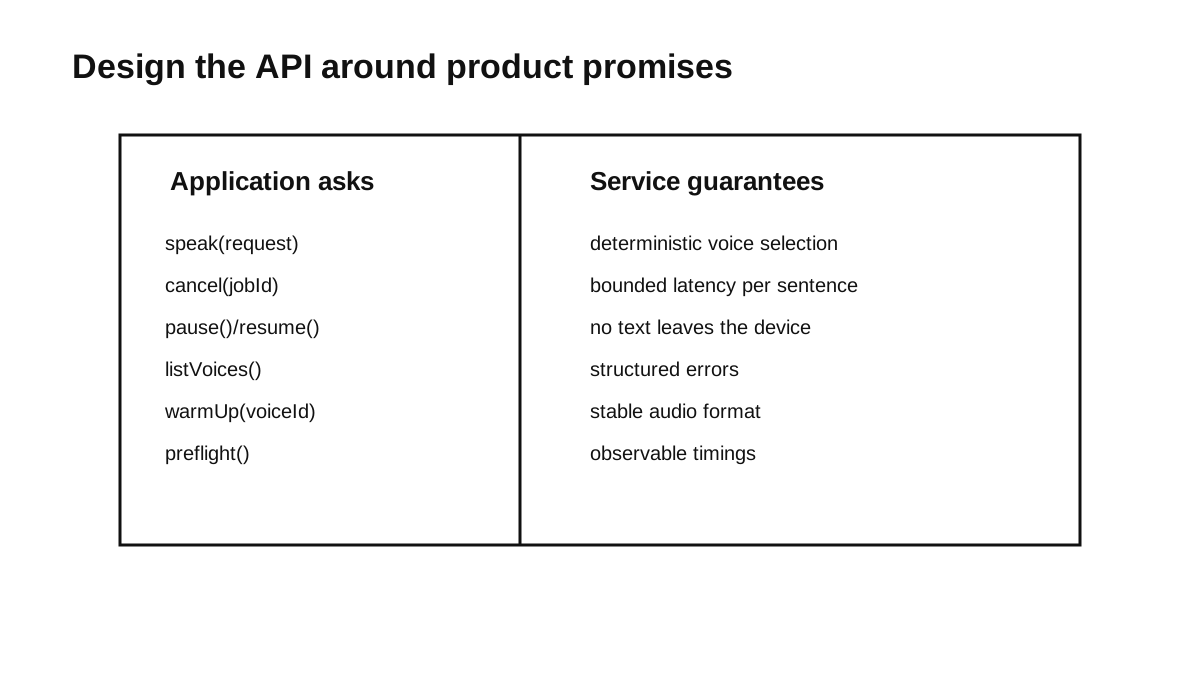
Write the Contract First
A good local speech service has a tiny, simple public API:
type SpeakRequest = {
  text: string;
  voiceId?: string;
  priority?: "interactive" | "background";
  interrupt?: boolean;
  metadata?: Record<string, string>;
};

type SpeechJob = {
  id: string;
  state: "queued" | "synthesizing" | "playing" | "done" | "cancelled" | "failed";
};

type SpeechEvent = {
  jobId: string;
  state: SpeechJob["state"];
  error?: SpeechError;
};

interface SpeechService {
  speak(request: SpeakRequest): Promise<SpeechJob>;
  cancel(jobId: string): Promise<void>;
  cancelAll(): Promise<void>;
  listVoices(): Promise<VoiceInfo[]>;
  preflight(): Promise<PreflightReport>;
  subscribe(listener: (event: SpeechEvent) => void): () => void;
}
Here, speak() acknowledges that the service accepted a job; it does not wait for playback to finish. State changes arrive through subscribe(), so the UI can render progress without polling or importing an engine SDK.
The interface deliberately omits:
- Hardcoded ONNX file paths.
- CLI flags.
- Platform-specific audio device IDs.
- Direct
importstatements for Piper or sherpa-onnx. - An assumption that synthesis and playback happen at the same time.
That absence is the point of the boundary. The UI needs job identity and state; the speech layer owns how the audio is made and played.
Keep the Mess Behind the Boundary
Behind the API, I would separate these responsibilities:
SpeechService
  VoiceCatalog
  TextNormalizer
  SentenceSplitter
  Queue
  EngineRouter
  EngineAdapters
  AudioCache
  Player
  Telemetry
These names describe responsibilities, not necessarily classes or processes. The VoiceCatalog records installed voices and their metadata. Text normalization and sentence splitting prepare input. The queue owns ordering and interruption. The router selects an eligible backend, adapters translate the common request into engine-specific calls, and the player talks to the operating system’s audio layer.
The single most important boundary here is the adapter:
interface TtsEngineAdapter {
  id: string;
  capabilities(): EngineCapability;
  synthesize(input: EngineSynthesisInput): Promise<EngineSynthesisOutput>;
  preflight(): Promise<EngineHealth>;
}
This does not make engines interchangeable. They still differ in model formats, language coverage, controls, licenses, and cancellation behavior. It contains those differences in the adapter and routing policy instead of letting them leak into each caller.
Queue Sentences, Not Novels
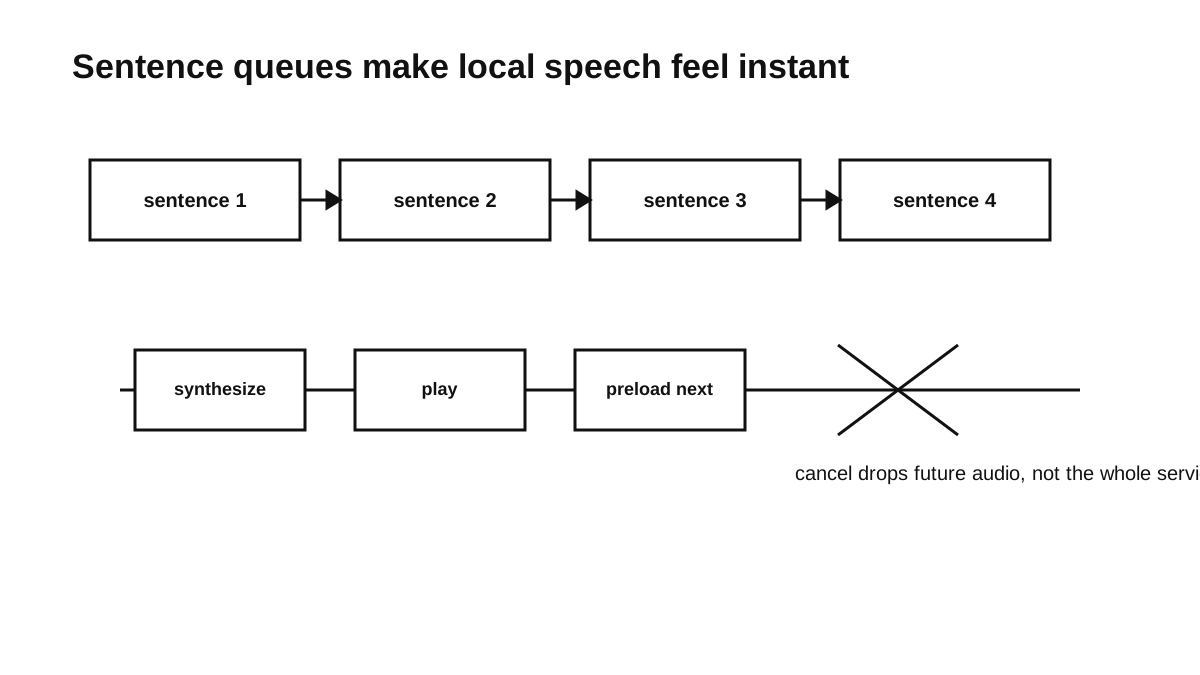
For interactive speech, sentence boundaries are a useful starting point. A whole document delays the first playable output and gives the queue a large unit to cancel or retry. A sentence is usually small enough to schedule while retaining natural context:
The deployment finished successfully.
Three containers restarted.
One warning remains in the database migration log.
This can improve four parts of the interaction:
- Faster time-to-first-audio: The service can begin playback of the first sentence while it generates the next one.
- Bounded cancellation: Queued sentences can be discarded immediately, even when the active engine call cannot be interrupted safely.
- Smaller retries: One failed sentence can be retried without synthesizing the entire document again.
- More reusable cache entries: Repeated short prompts can reuse audio, provided the cache key includes every setting that changes the output.
Sentence splitting is not perfect. Abbreviations, decimal numbers, and languages without familiar punctuation need testing, and some engines produce better prosody with more context. The splitter should therefore be a policy you can change, not a rule buried in the UI.
The queue also needs an explicit interruption policy. An interactive warning may need to interrupt a long background read, while another background request can wait. User intent matters more here than strict first-in, first-out ordering.
Start with a basic policy:
if request.interrupt:
  cancel queued jobs
  stop current playback
  start this request
else:
  append request to queue
This policy still needs defined semantics: does cancel mean “remove queued work,” “request synthesis cancellation,” “stop playback,” or all three? The service can promise that queued work and playback stop promptly. It should only promise immediate synthesis cancellation when the selected adapter supports it.
Route by Capability, Not Guesswork
Routing should be a visible policy over declared capabilities, not a collection of platform checks scattered through product code:
type EngineCapability = {
  languages: string[];
  platforms: string[];
  outputModes: Array<"file" | "stream">;
  supportsCancellation: boolean;
  controls: Array<"speed" | "pitch" | "volume">;
};
An engine is eligible only if its installed version, voice, platform, language, and requested controls match. The preference order can then be explicit:
Need en-US, interactive, desktop:
  try the configured neural voice
  otherwise use an approved en-US fallback

Need embedded ARM, native library preferred:
  try an installed native adapter and compatible model
  otherwise report no eligible voice

Need diagnostic mode:
  use a known, small local adapter
The candidates have materially different shapes. sherpa-onnx publishes support across desktop, mobile, embedded targets, and several language bindings. The current Piper project offers command-line, Python, and C/C++ APIs under GPL-3.0. eSpeak NG is another possible local fallback, but whether its voice and pronunciation are acceptable is a product decision.
Licensing belongs in package metadata rather than a coarse engine capability flag. Engine code and voice models can have different terms; Piper’s voice documentation tells users to inspect each model card. The router should reject an unapproved engine-and-voice combination instead of treating every installed model as deployable.
Package the Speech Stack in Layers
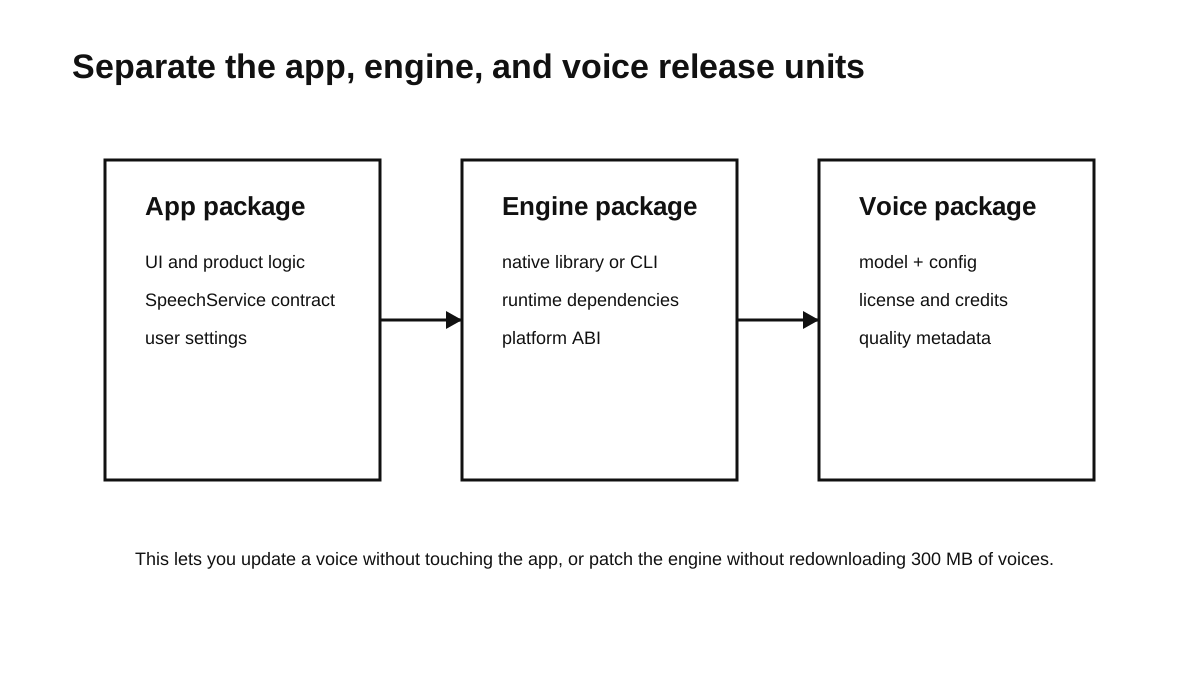
Treat the speech stack as three logical release units:
- App: The UI, product logic, and Speech API implementation.
- Engine: Binaries and platform-specific native libraries.
- Voice: Models, configuration, dictionaries, attribution, and license information.
They may still ship in one installer. Keeping separate identities and versions is what makes these operations possible:
- Can a pronunciation dictionary change without replacing unrelated application files?
- Can we keep our initial installer small and download heavy voices on-demand?
- Can users delete voices they don’t use to save space?
- Can we roll back a voice model independently?
- Can we push a new Linux binary without touching the Windows release?
Each package manifest should record a version, checksum, compatible engine range, origin, and license identifiers. If packages can be downloaded after installation, the updater also needs an authenticated source, atomic installation, and a last-known-good version. Separation without integrity and compatibility checks merely creates more ways to assemble a broken stack.
Preflight Before the User Clicks Play
A local TTS system should discover predictable failures before the first real request. I would run cheap checks at startup or voice selection, deeper checks after installation or update, and keep a diagnostic synthesis probe available for troubleshooting.
Your preflight() method should check:
- Is the engine binary actually on disk?
- Does it have execution permissions?
- Did the native libraries load?
- Is the ONNX model file there?
- Is the config JSON there?
- Do the file checksums match what we expect?
- Can we write to the audio cache folder?
- Can the selected playback path be initialized when the platform permits that check?
- Can a short diagnostic sentence be synthesized when a deep check is requested?
Return the results as simple, structured JSON:
{
  "ok": false,
  "checks": [
    {
      "name": "voice-model-checksum",
      "ok": false,
      "message": "Expected sha256 abc..., got def..."
    }
  ]
}
Preflight cannot prove that every sentence will synthesize or that an audio device will remain available. It can turn several vague failures into specific ones, such as a checksum mismatch or a missing native library, before a job enters the queue.
Keep Playback Separate
Audio playback involves a lot of messy, platform-specific code. Keep it hidden behind an interface:
interface AudioPlayer {
  play(source: AudioSource): Promise<void>;
  stop(): Promise<void>;
  setVolume(value: number): Promise<void>;
}
On desktop this adapter may call a native audio API or a bundled player. On mobile it also has to respect audio-session rules. A headless service may return an audio file or stream and never create a player at all.
Synthesis produces audio; playback consumes it. Keeping that seam makes it possible to test synthesis without speakers, cache output before playback, and stop the player without pretending that the engine itself was cancelled.
Speech Must Fail Without Taking the App Down
Failure is part of the public contract. A small stable error taxonomy gives the product code something useful to act on:
VOICE_NOT_FOUND
ENGINE_MISSING
MODEL_CORRUPT
SYNTHESIS_TIMEOUT
AUDIO_DEVICE_UNAVAILABLE
TEXT_UNSUPPORTED
LICENSE_BLOCKED
Recovery should be just as explicit:
AUDIO_DEVICE_UNAVAILABLE: fail the job and surface the platform-specific action the user can take.MODEL_CORRUPT: quarantine the package, retain a known-good local version if one exists, and offer a verified replacement. A supposedly offline feature should not begin a network download without policy or user consent.SYNTHESIS_TIMEOUT: stop or isolate the timed-out adapter. Fall back only when another approved voice supports the requested language and the product permits the voice change.TEXT_UNSUPPORTED: identify the affected job or chunk. Silently skipping words or sentences can change meaning, so the caller should decide whether to continue.
Telemetry, if the product has it, should record bounded error data and avoid speech text by default. For an optional read-aloud feature, a speech failure should not crash unrelated application work. For an accessibility-critical path, however, the failure must be prominent; calling speech an enhancement would understate its role.
Keep Change Behind One Boundary
Choosing Piper, sherpa-onnx, or eSpeak NG does not remove the architectural problem. Engine APIs, model packages, licenses, and platform audio behavior can all change independently.
A stable Speech API gives application code one job model while adapters and package manifests absorb those differences. The boundary is doing its work when a UI test can use a fake adapter, an engine can be replaced without editing the Play button, and a failed voice package produces a specific, recoverable error.
Series
Local Cross-Platform TTS
- 01 A Field Guide to Shipping Local TTS Across Platforms
- 02 Shipping Piper as a Cross-Platform Local TTS Runtime
- 03 Designing a Stable API for Local Text-to-Speech Current note
- 04 Testing Local TTS: Pronunciation, Latency, and Release Gates
- 05 Building Dream TTS Around Durable Local Speech Jobs

Software Engineering
A Field Guide to Shipping Local TTS Across Platforms
7 min read
Software Engineering