
Driving a Phone Through Its Accessibility Tree
Every Android app already publishes a live, structured description of its screen, for screen readers. That description is an API, and it turns a phone into something an agent can operate.

On this page
Audio edition
0:00 / 5:57
Ready
Every Android app on your phone is already publishing a live, structured description of its screen: a tree of nodes carrying text, labels, roles and bounds, updated as the interface changes. It exists so screen readers can speak an app to someone who cannot see it, and nothing in it assumes the reader is a person.
That is the whole idea behind social-puppet . A language model also cannot see, and Android has been solving that exact problem since 2009.
The screen as one line per node
Flattened to one line per visible node, the X composer arrives like this:
15 | What's happening? @(147,453) 431x59
24 | Post [btn] @(872,209) 176x95
79 | yt [btn] [ime] @(115,1459) 272x127
Every line names something a model can act on, including the keyboard, which is a separate window and tagged as one. The home feed comes to 156 nodes, 137 of them the app’s own and the rest the system bars, which a model reads in a few hundred tokens.
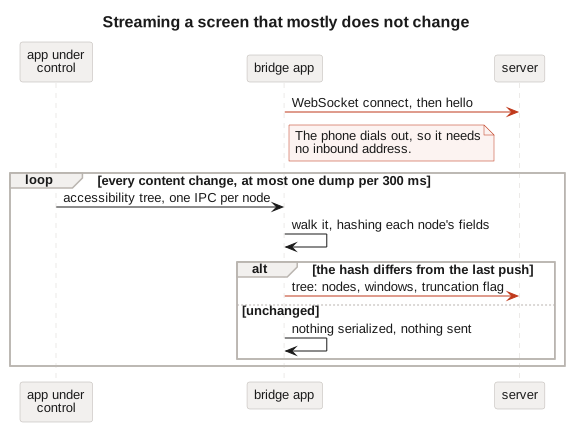
The phone runs a small AccessibilityService that walks this tree and dials out over a WebSocket, since a phone on a home network has no inbound address and would lose one anyway the moment it changed networks. A server on a stable address holds the only durable state: the latest tree per device, an event ring, a short command queue. Controllers talk to that server over HTTP and never touch the phone. About 2,100 lines of Kotlin, 1,100 of TypeScript, one runtime dependency.
Addressing nodes by role rather than coordinates
Every line above ends with coordinates, and reaching for them is the tempting mistake. They describe one snapshot. By the time a model has read the screen, thought, and chosen something to press, the phone has rendered frames, animated a list, possibly loaded newer posts, and the row it meant has moved or gone.
So a command names its target rather than its position: match this text, or this content description, or this resource id. The phone evaluates that against the tree as it stands at the moment of the tap, a fraction of a second after the model committed to it. The controller decides what to press and the device works out where that currently is, which is late binding borrowed from programming languages and pointed at a screen.
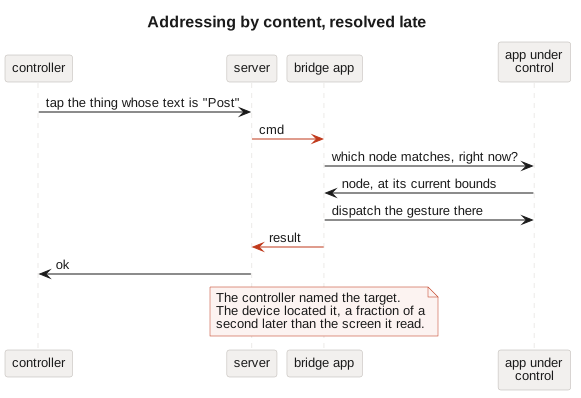
The same choice is what separates this from automation driven by screenshots and coordinates. A description of content survives a layout change, a larger font, a dark theme, a translated interface, and a phone of a different size. When the target genuinely is not on screen it says so, instead of pressing whatever has drifted into the spot where it used to be.
The cross-process cost of reading the tree
The tree belongs to the app being inspected, and it lives in that app’s process, so reading it means asking another process about one node at a time. A single screen is hundreds of those questions. Android also reports a content change on close to every frame an app animates, and answering each report with a fresh screen would mean re-serializing and shipping the whole thing several times a second, to a phone meant to stay connected all day.
The service therefore hashes each node’s fields as it reads them and compares the total against the last screen it sent. The walk still happens; the serializing and the sending happen only when that number changes. A screen sitting still produces one message every twenty seconds, and each message means something moved.
Finding the node to tap is the same trade in miniature. Crawling the tree in search of matching text costs one cross-process question per node visited, while findAccessibilityNodeInfosByViewId and findAccessibilityNodeInfosByText hand the search to the app itself and come back with the matches in a single call. Hundreds of questions collapse into one.
Reaching something below the fold is the third case, because the tree contains only what is currently rendered, and a feed holds far more than it draws. Scrolling from the controller costs a network round trip, a fresh screen and a model turn for every swipe, none of which the model has anything to decide between. One scrollTo command carrying the target lets the phone scroll, look again and repeat on its own: two scrolls away, 1.1 seconds.
Unlabelled images and the screenshot fallback
An unlabelled image is the word “Image”. A video frame is nothing at all. Ask whether the right photo attached and the tree has no answer, so there is a screenshot command, and those bytes take the file path rather than the socket: the phone stages the image on the server over HTTP and the WebSocket carries only an identifier. It costs 30 KB as WebP and far more tokens than the text, which keeps it an exception rather than the view.
Three limits have no workaround. Windows marked FLAG_SECURE, which means banking apps and DRM video, cannot be captured by anything. An accessibility service cannot dismiss a lock screen, so a reboot needs a human. And Android exposes global actions rather than key codes, so back, home, recents, the shade and the d-pad are the entire keyboard.
Screen-reader support as the only requirement
An agent that drives a phone this way asks one thing of an app: that it be usable by a screen reader. No partnership, no API key, no cooperation beyond what the app already owes its blind users.
That cuts both ways, and it is the part I did not expect. Apps that resist automation resist it by hiding content from the accessibility layer, mislabelling their controls, or drawing themselves as one opaque canvas. Every one of those is also, precisely, an app a blind person cannot use. Which means the cheapest way to make an app usable by agents is the work its accessibility audit asked for years ago.

Software Engineering