
Testing Local TTS: Pronunciation, Latency, and Release Gates
A practical quality loop for local text-to-speech: representative fixtures, contextual normalization, useful latency metrics, defect labels, and release checks.

On this page
A local text-to-speech model can sound convincing in a demo and still be wrong for the product around it. It might misread a name, turn an amount into the wrong number, pause too late in an urgent alert, or take too long to begin playback.
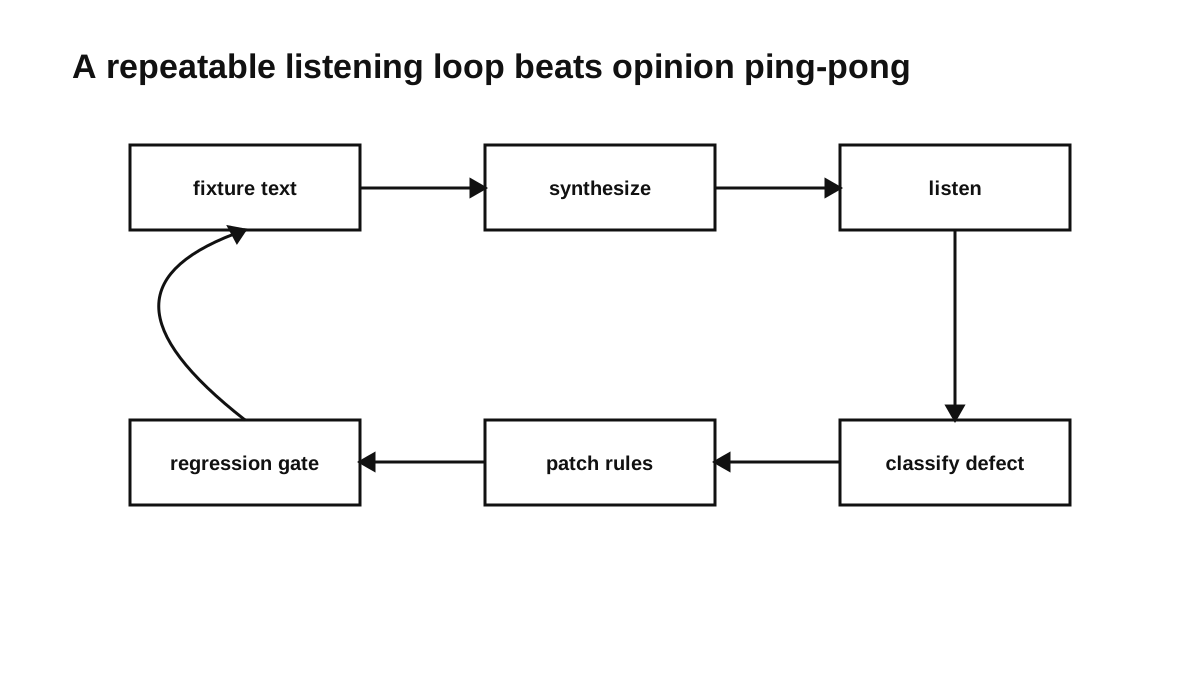
“Sounds good” is too broad to diagnose any of those failures. I prefer a smaller, repeatable loop:
- Choose text that represents what the application says.
- Synthesize it through the same path the application uses.
- Listen to the output and record specific defects.
- Change one relevant part of the pipeline.
- Run the same fixtures again before release.
This does not make speech quality fully objective. Listening still requires judgment. It does make that judgment traceable: there is an input, an output, a defect label, and a change that can be reviewed.
Start with representative fixtures
Build the fixture pack from text the application is likely to speak. A deployment tool, for example, has different failure cases from a maths tutor or a finance application.
Infrastructure fixtures might include:
The deployment finished at 18:42 UTC.
The nginx upstream returned HTTP 502 for 3.7 percent of requests.
Open /var/log/postgresql/postgresql-16-main.log.
CPU usage stayed above 90 percent for five minutes.
Dr. Wanjiku approved ticket CK-2041.
A learning application might need:
Photosynthesis converts light energy into chemical energy.
Solve x squared plus five x plus six equals zero.
The answer is approximately 3.14159.
Read the sentence again, then tap continue.
A finance application should exercise money, dates, identifiers, and local terms:
Your M-PESA balance changed by KES 2,450.
Invoice INV-2026-0041 is due on April 30.
The exchange rate moved from 129.80 to 130.15.
These are illustrative inputs, not a universal test suite. The useful categories come from the product’s actual text. A starter pack might cover:
categories:
  - numbers
  - dates
  - file_paths
  - acronyms
  - names
  - domain_terms
  - mixed_language
  - long_sentences
  - urgent_alerts
Keep the first pack small enough to run and review after every meaningful change. Add a fixture when it captures a real requirement or reproduces a defect; a large collection with no clear purpose only makes review slower.
Inspect the text before replacing the voice
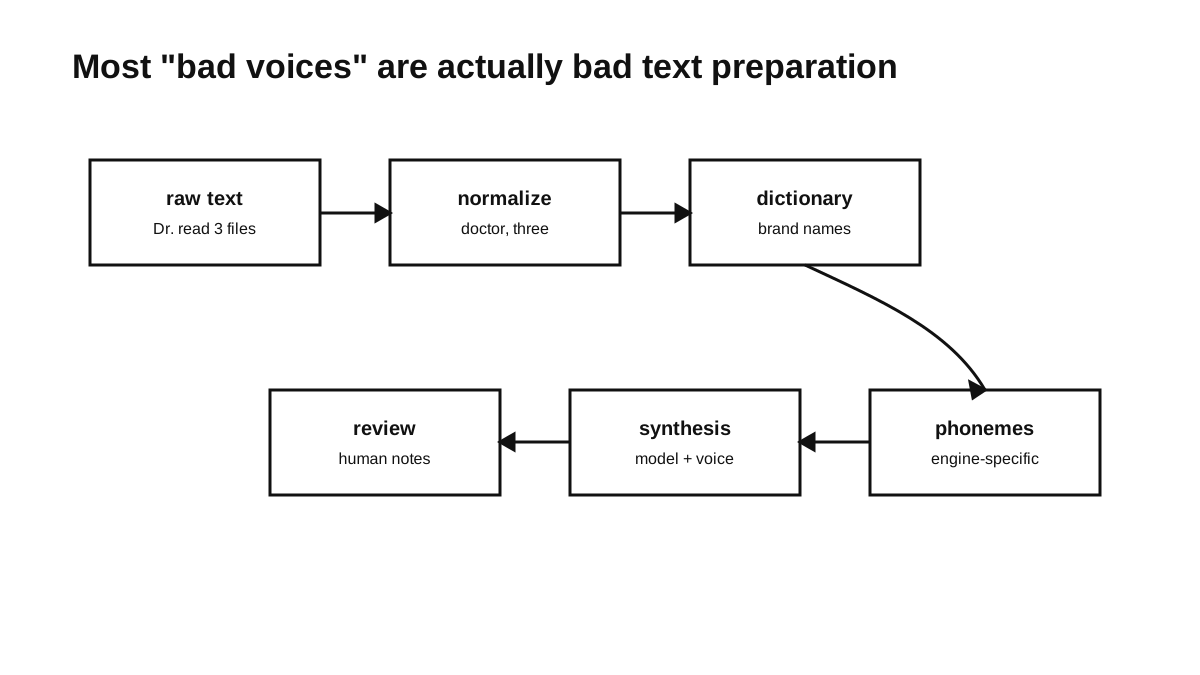
Some apparent voice problems begin in the text presented to the engine. Consider this sentence:
Dr. Njoroge read 3 logs from /srv/api-v2 at 03:05 UTC.
It leaves several decisions unresolved:
- Does
Dr.mean “doctor” or “drive” in this context? - Does
Njorogeneed a pronunciation override for this voice? - Should
3be read as “three”? - Should
/srv/api-v2be spoken literally, simplified, or omitted? - Is
03:05a time, and what form should the application use? - Should
UTCbe spelled out or expanded?
The normalizer should make product decisions like these before synthesis. A small pronunciation dictionary can handle stable terms:
terms:
  "Dr.":
    spoken: "doctor"
    when: "before_person_name"
  "nginx":
    spoken: "engine x"
  "PostgreSQL":
    spoken: "post gres cue ell"
  "KES":
    spoken: "Kenyan shillings"
  "UTC":
    spoken: "U T C"
The spellings above are application-level hints. Their output still needs to be checked with the chosen engine and voice. Proper names and specialist vocabulary may also need user-provided overrides, because a centrally maintained dictionary cannot anticipate every name or dialect.
Normalize with context and keep the original
Blind string replacement is easy to implement and easy to get wrong. 3/4 could be a fraction, a date, part of a path, or a version. May could be a month, a verb, or a person’s name.
A normalizer therefore needs ordered, narrow rules rather than one global substitution pass:
if token matches an unambiguous date format:
  read as date
elif token appears inside a file path:
  apply the product's path-reading policy
elif token is a known acronym:
  use its configured expansion
elif token is in the pronunciation dictionary:
  use the matching contextual rule
else:
  leave it unchanged
Keep the original text alongside the normalized form inside the process, even if neither is written to persistent logs. That makes a bad transformation diagnosable. It also avoids asking the synthesizer to act as the source of truth: the visible text remains authoritative, while the normalized form is only a pronunciation aid.
Every rule should have at least one positive fixture and, where ambiguity is possible, a fixture that must remain unchanged. Over-normalization can silently change meaning, so the safe default is to leave uncertain text alone.
Measure the latency the user encounters
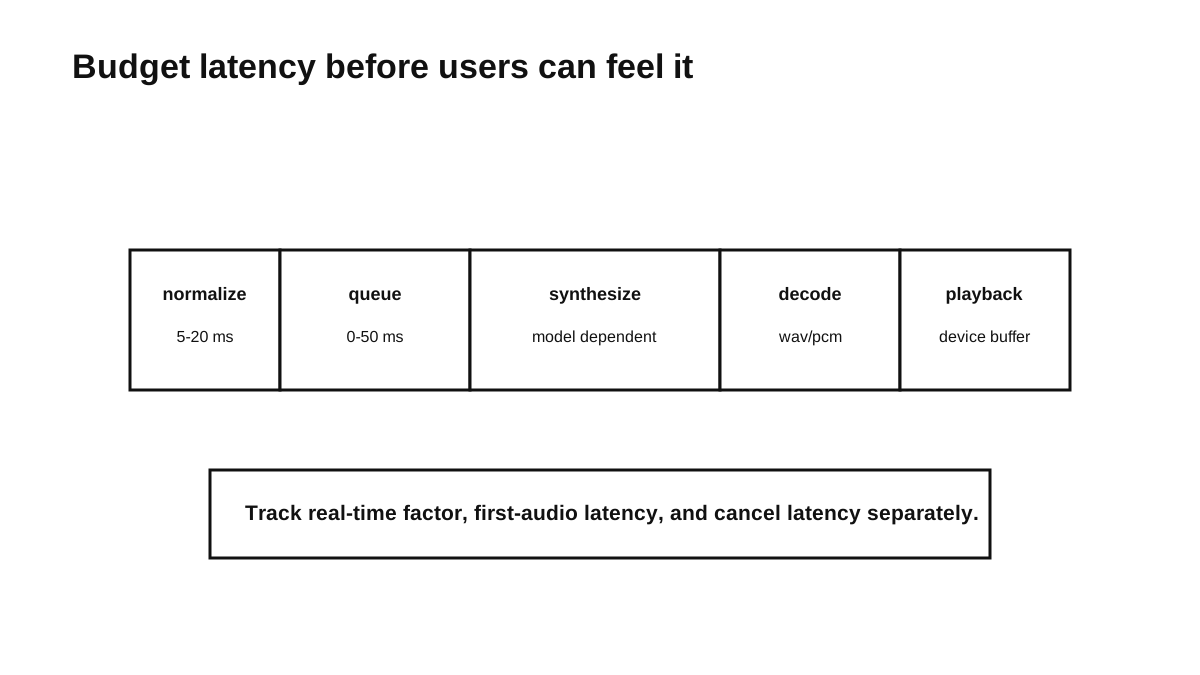
An end-to-end duration is useful for monitoring, but it is not enough for diagnosis. Record the stages that the implementation can measure reliably:
- normalization time
- queue wait time
- engine startup time, when the process is not already warm
- synthesis time
- decoding or file-write time
- time to first playable audio, when the engine streams or emits chunks
- playback buffer delay
- cancellation latency
The distinction matters. A slow first run may be model startup, while later requests may be queue-bound. A system that writes a complete WAV before playback cannot claim streaming time-to-first-audio; in that design, playback begins only after synthesis and file handling complete.
A structured event might look like this:
{
  "event": "tts.job.finished",
  "voice_id": "en-us-lessac-medium",
  "engine": "piper",
  "chars": 142,
  "normalize_ms": 3,
  "queue_ms": 0,
  "synthesize_ms": 488,
  "audio_ms": 6120,
  "first_audio_ms": 530,
  "rtf": 0.079
}
Those numbers are an example schema, not a benchmark. Define each field once and keep its clock boundaries consistent.
Real-time factor compares synthesis time with the duration of the generated audio:
rtf = synthesis_duration / generated_audio_duration
An RTF below 1 means synthesis completed faster than the audio would play, but it does not by itself guarantee a responsive interface. Interactive speech also depends on queueing and time to first playable audio. Background narration may care more about throughput, resource use, and whether long jobs complete reliably.
Record defects that point toward a diagnosis
When a sentence sounds wrong, record more than “bad voice.” A compact defect log is enough:
fixture_id, engine, voice, defect, severity, note
infra-004, piper, lessac, acronym, medium, "UTC read as a word"
finance-002, piper, lessac, number, high, "KES amount not expanded"
learn-008, kokoro, default, pause, low, "pause too long after comma"
Useful categories include:
- pronunciation
- number reading
- acronym handling
- pause or rhythm
- clipped audio
- volume changes
- latency spikes
- crashes
- unsupported characters
The category narrows the investigation; it does not prove the cause. A pronunciation error might come from normalization, a dictionary rule, or the model. Clipped audio could come from synthesis, encoding, buffering, or playback. Keep the observed failure separate from the suspected fix until a rerun confirms it.
Track packaging and licence checks as release concerns rather than speech defects. They can still block a release, but mixing them into listening results makes both sets of records harder to interpret.
Use automation for structure and people for speech
Before releasing a voice or configuration update, check the artefacts and rerun the fixtures:
Voice release gate
  [ ] model checksum changed intentionally
  [ ] config checksum changed intentionally
  [ ] licence file present and reviewed
  [ ] representative fixture pack synthesized
  [ ] audio files decoded successfully
  [ ] latency stayed within the product budget on target hardware
  [ ] pronunciation changes reviewed
  [ ] rollback path tested or documented
CI can catch structural failures:
For each fixture:
  synthesize audio
  assert exit code is 0
  assert output decodes
  assert duration is plausible for the fixture
  assert the job finishes before its timeout
These checks can detect crashes, corrupt output, empty audio, and large performance regressions. They do not establish that the engine said the correct words. Unless the project has a separately validated speech-recognition comparison, pronunciation and meaning still require listening.
Review the fixtures where mistakes have high impact or repetition makes a small flaw costly:
- people’s names
- money and quantities
- dates and times
- acronyms and domain terms
- short, urgent alerts
Ask focused questions: Did the spoken words preserve the visible meaning? Was a name or amount wrong? Did playback begin within the product’s budget? Did cancellation stop promptly? Would a repeated prompt become distracting? Specific questions produce defects that someone can reproduce.
Keep private text out of routine telemetry
Local synthesis keeps text off a remote TTS service, but careless application logs can give that privacy back. Routine telemetry usually needs metadata, not the sentence itself:
{
  "chars": 118,
  "voice_id": "en-us-lessac-medium",
  "engine": "piper",
  "synthesis_ms": 420,
  "error_code": null
}
Do not place raw messages, medical notes, alerts, or account details in ordinary logs. If reproducing a defect genuinely requires the input, make capture explicit and temporary, show what will be stored, restrict access, and provide a clear deletion path. A synthetic fixture is preferable whenever it reproduces the same failure.
A quality loop that survives model changes
The model is only one part of local speech. Normalization decides what it receives; queueing and playback shape responsiveness; packaging determines which voice and configuration ship; fixtures expose regressions.
Start with a small fixture pack and measurements your current architecture can actually produce. Label what you hear, change the smallest relevant part, and rerun the same inputs. That record will not eliminate subjective judgment, but it gives the next voice update something much more useful than a favourable demo to compete against.
Series
Local Cross-Platform TTS
- 01 A Field Guide to Shipping Local TTS Across Platforms
- 02 Shipping Piper as a Cross-Platform Local TTS Runtime
- 03 Designing a Stable API for Local Text-to-Speech
- 04 Testing Local TTS: Pronunciation, Latency, and Release Gates Current note
- 05 Building Dream TTS Around Durable Local Speech Jobs

Software Engineering
Shipping Piper as a Cross-Platform Local TTS Runtime
9 min read
Software Engineering
A Field Guide to Shipping Local TTS Across Platforms
7 min read
Software Engineering