
How I Run Codex from Mattermost on My Phone
The architecture, bridge, and security boundary behind my self-hosted Mattermost interface to Codex on a local development machine.

On this page
I run Codex on a desktop where the projects, build cache, local services, and credentials already live. Mattermost gives me a way to reach that machine from my phone without pretending that chat replaces a terminal.
A message such as this is enough to start a small job:
codex check nginx and summarize anything unhealthy
The bridge receives the message, runs Codex on the desktop, and posts the answer back into the same Mattermost thread. SSH remains the ground truth when I need direct control. Chat is simply a more convenient front end for inspection, small edits, and other work that does not need a full terminal.
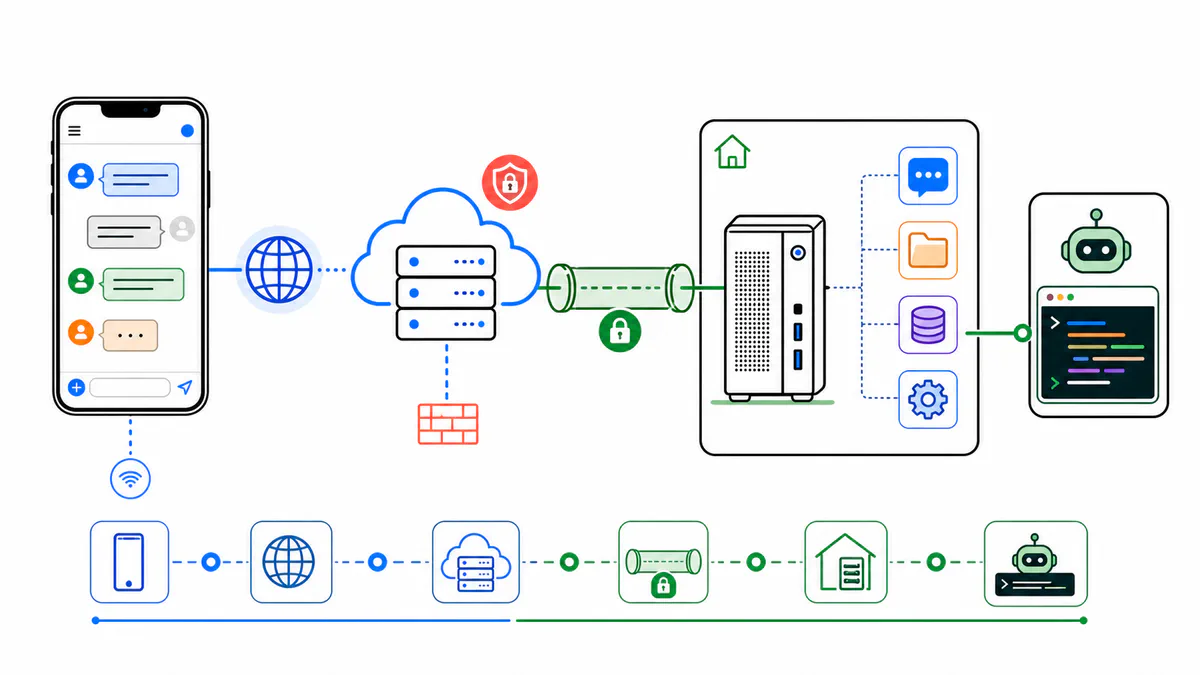
Keep the application on the machine with the work
The system has a deliberately narrow shape:
Phone
  -> https://chat.example.com
  -> public HTTPS endpoint
  -> tunnel to the desktop
  -> local nginx
  -> Mattermost on 127.0.0.1:8065
  -> bridge service
  -> codex exec
The desktop is the application server. The public endpoint terminates HTTPS and routes traffic; it does not need a copy of the code or another Mattermost installation.
That endpoint can be a hosted tunnel or a small VPS. I prefer to keep this choice separate from the rest of the design. Cloudflare Tunnel can forward the public hostname without opening an inbound home-network port. A VPS and a reverse SSH tunnel provide the same basic boundary with components I can inspect directly.
This placement also keeps Codex beside the resources it may need. Moving the chat interface to a public server should not force the agent, Docker socket, SSH keys, databases, or build cache onto that server.
Why Mattermost is enough
Mattermost already provides the parts this interface needs: accounts, private channels, direct messages, bot users, mobile clients, file uploads, threads, WebSockets, and an HTTP API. The bridge only has to translate between a Mattermost post and a Codex process.
I use one private team, a bot account, and a small set of allowed channels. That is easier to operate than a separate mobile application, and it leaves access control with a service built to handle accounts and conversations.
Install Mattermost locally
The following setup assumes Ubuntu or Debian, PostgreSQL, and a system Mattermost service. Version 11.7.2 is the release installed for this setup; substitute the version you intend to operate rather than treating the number as a permanent latest release.
Install the local dependencies:
sudo apt update
sudo apt install -y postgresql postgresql-contrib nginx
Create the database and role:
sudo -u postgres psql
CREATE USER mattermost WITH PASSWORD 'use-a-long-random-password';
CREATE DATABASE mattermost OWNER mattermost;
\q
Install the Mattermost release under /opt:
cd /tmp
curl -fLO https://releases.mattermost.com/11.7.2/mattermost-11.7.2-linux-amd64.tar.gz
sudo useradd --system --user-group mattermost
sudo tar -xzf mattermost-11.7.2-linux-amd64.tar.gz -C /opt
sudo mkdir -p /opt/mattermost/data
sudo chown -R mattermost:mattermost /opt/mattermost
In /opt/mattermost/config/config.json, set the public URL while keeping the listener on the loopback interface:
{
  "ServiceSettings": {
    "SiteURL": "https://chat.example.com",
    "ListenAddress": "127.0.0.1:8065",
    "WebsocketURL": "wss://chat.example.com",
    "EnableLocalMode": true,
    "EnableUserAccessTokens": true,
    "EnableBotAccountCreation": true
  },
  "TeamSettings": {
    "EnableOpenServer": false,
    "EnableUserCreation": false
  },
  "EmailSettings": {
    "EnableSignUpWithEmail": false
  }
}
Set SqlSettings.DataSource to the local database. Keep the real password out of shell history and shared configuration examples:
postgres://mattermost:use-a-long-random-password@127.0.0.1:5432/mattermost?sslmode=disable&connect_timeout=10&binary_parameters=yes
I run Mattermost with this systemd unit:
[Unit]
Description=Mattermost
After=network.target postgresql.service
Requires=postgresql.service

[Service]
Type=notify
User=mattermost
Group=mattermost
WorkingDirectory=/opt/mattermost
ExecStart=/opt/mattermost/bin/mattermost
Restart=always
RestartSec=10
LimitNOFILE=49152

[Install]
WantedBy=multi-user.target
Enable the service and verify the local API before adding any proxy:
sudo systemctl daemon-reload
sudo systemctl enable --now mattermost
curl http://127.0.0.1:8065/api/v4/system/ping
The ping response should report status: OK.
Put nginx in front of Mattermost
Mattermost remains on 127.0.0.1:8065; local nginx receives the tunneled HTTP traffic. The WebSocket route needs explicit upgrade headers because the mobile and web clients use it for live updates.
server {
    listen 80;
    listen [::]:80;
    server_name chat.example.com;

    client_max_body_size 100M;

    location ~ /api/v[0-9]+/(users/)?websocket$ {
        proxy_set_header Upgrade $http_upgrade;
        proxy_set_header Connection "upgrade";
        proxy_set_header Host $host;
        proxy_set_header X-Real-IP $remote_addr;
        proxy_set_header X-Forwarded-For $proxy_add_x_forwarded_for;
        proxy_set_header X-Forwarded-Proto https;
        proxy_read_timeout 86400;
        proxy_pass http://127.0.0.1:8065;
    }

    location / {
        proxy_set_header Host $host;
        proxy_set_header X-Real-IP $remote_addr;
        proxy_set_header X-Forwarded-For $proxy_add_x_forwarded_for;
        proxy_set_header X-Forwarded-Proto https;
        proxy_read_timeout 300;
        proxy_pass http://127.0.0.1:8065;
    }
}
Validate the configuration, reload nginx, and test the route locally:
sudo nginx -t
sudo systemctl reload nginx
curl -H 'Host: chat.example.com' http://127.0.0.1/api/v4/system/ping
Add a public route without moving the app
With a VPS, I use this path:
chat.example.com -> VPS proxy -> 127.0.0.1:18080
                 -> reverse SSH tunnel -> desktop nginx
The desktop opens the reverse tunnel:
ssh -N \
  -o ExitOnForwardFailure=yes \
  -o ServerAliveInterval=30 \
  -o ServerAliveCountMax=3 \
  -R 18080:127.0.0.1:80 \
  tunnel-user@your-vps
A systemd service can keep that connection alive. On the VPS, the public proxy sends traffic to the loopback port. For Nginx, the relevant upstream is:
proxy_pass http://127.0.0.1:18080;
For Caddy, the equivalent is:
chat.example.com {
    reverse_proxy 127.0.0.1:18080
}
The tunnel user should have only the SSH permissions this route needs. The public proxy also needs to preserve the original host and forwarding headers, and the HTTPS route must support WebSocket upgrades. Test both normal API requests and live Mattermost updates before relying on the mobile client.
Create the private workspace and bot
Mattermost local mode lets mmctl administer the server without exposing an administrative API route. Create the first user and private team:
/opt/mattermost/bin/mmctl --local user create \
  --email you@example.com \
  --username you \
  --password 'use-a-real-password' \
  --system-admin

/opt/mattermost/bin/mmctl --local team create \
  --name home \
  --display-name Home \
  --private
Create an allowed channel and a private operating channel:
/opt/mattermost/bin/mmctl --local channel create \
  --team home \
  --name codex \
  --display-name Codex

/opt/mattermost/bin/mmctl --local channel create \
  --team home \
  --name codex-private \
  --display-name "Codex Private" \
  --private
Create the bot and ask mmctl to generate its token:
/opt/mattermost/bin/mmctl --local bot create codex \
  --display-name Codex \
  --description "Local Codex bridge bot" \
  --with-token
Store that token immediately; it grants the bot’s access. Add the bot and your user to the intended team and channels, and keep other members out of any channel whose full thread transcript will be sent to Codex.
Keep the bridge small and explicit
The bridge performs six operations:
- Receive a post as the bot.
- Reject bot-authored posts and users outside the allowlist.
- Accept only an allowed channel or a direct message with the bot.
- Load a bounded transcript for the current thread.
- Run
codex execin the intended working directory. - Post the result under the same thread root.
The central process boundary looks like this:
import { spawn } from "node:child_process";

const allowedUsers = new Set(["you"]);
const allowedChannels = new Set([process.env.CODEX_CHANNEL_ID]);

async function handlePost(post) {
  if (post.user_id === botUserId) return;

  const user = await getUser(post.user_id);
  if (!allowedUsers.has(user.username)) return;

  const channel = await getChannel(post.channel_id);
  const isAllowedChannel = allowedChannels.has(channel.id);
  const isDirectMessage = channel.type === "D";
  if (!isAllowedChannel && !isDirectMessage) return;

  const prompt = post.message.replace(/^@?codex:?\s*/i, "").trim();
  if (!prompt) return;

  const rootId = post.root_id || post.id;
  const threadContext = await getThreadTranscript(rootId);

  await reply(rootId, "Running Codex...");

  const child = spawn(process.env.CODEX_BIN || "codex", [
    "--ask-for-approval", "never",
    "--sandbox", "danger-full-access",
    "-C", "/home/you",
    "exec",
    "--skip-git-repo-check",
    "-"
  ]);

  child.stdin.end([
    "Use the Mattermost thread context for continuity.",
    "Treat the latest user prompt as the instruction to answer now.",
    "",
    "Mattermost thread context:",
    threadContext,
    "",
    "Latest user prompt:",
    prompt
  ].join("\n"));

  let out = "";
  let err = "";

  child.stdout.on("data", chunk => out += chunk);
  child.stderr.on("data", chunk => err += chunk);

  child.on("close", async code => {
    if (code === 0) {
      await reply(rootId, out || "Done.");
    } else {
      await reply(rootId, `Codex failed with exit ${code}\n\n${err}`);
    }
  });
}
This is the shape, not a complete production implementation. A production bridge also needs a bounded queue, a timeout that terminates the child process, output limits, WebSocket reconnection, polling fallback, duplicate-event handling, transcript limits, and useful journald logs. Without a queue, several phone messages can start several agents against the same working tree. Without transcript limits, a long thread becomes an uncontrolled prompt.
Group direct messages are intentionally absent from the example. Checking only the sender is not enough when the bridge forwards a transcript containing other people’s messages.
Run the bridge as a service
Place the bridge under /opt/mattermost-codex-bridge and keep its configuration in /etc/mattermost-codex-bridge.env:
MATTERMOST_URL=http://127.0.0.1:8065
MATTERMOST_WS_URL=ws://127.0.0.1:8065/api/v4/websocket
MATTERMOST_TOKEN=your-bot-token
MATTERMOST_BOT_USERNAME=codex
MATTERMOST_ALLOWED_USERNAMES=you
MATTERMOST_ALLOWED_CHANNEL_IDS=channel-id-1,channel-id-2
CODEX_BIN=/home/you/.local/bin/codex
CODEX_HOME=/home/you/.codex
CODEX_WORKDIR=/home/you
CODEX_TIMEOUT_MS=1200000
PATH=/home/you/.local/bin:/usr/local/bin:/usr/bin:/bin
CODEX_HOME must point to the directory containing the configuration and authentication available to this service account. Do not copy the example path blindly.
Protect the environment file:
sudo chown root:root /etc/mattermost-codex-bridge.env
sudo chmod 600 /etc/mattermost-codex-bridge.env
Then create the system service:
[Unit]
Description=Mattermost Codex bridge
After=network.target mattermost.service
Requires=mattermost.service

[Service]
User=you
WorkingDirectory=/opt/mattermost-codex-bridge
EnvironmentFile=/etc/mattermost-codex-bridge.env
ExecStart=/usr/local/bin/node /opt/mattermost-codex-bridge/bridge.mjs
Restart=always
RestartSec=5

[Install]
WantedBy=multi-user.target
Enable it and watch the first run:
sudo systemctl daemon-reload
sudo systemctl enable --now mattermost-codex-bridge
journalctl -u mattermost-codex-bridge.service -f
I use a deliberately small test message:
codex reply exactly with: bridge-ok
Once that works, replies can continue the same investigation. The bridge uses post.root_id || post.id both to fetch context and to choose the reply root, so a sequence such as the following stays together:
codex inspect the failing service
codex now check the last 50 log lines
codex draft the smallest fix
The transcript is useful context, but it is also input to an agent with local access. Keep allowed channel membership narrow and treat every forwarded message as untrusted instructions.
Make the trust boundary honest
This interface is useful because Codex runs on the real machine. That is also its main risk. With danger-full-access and approvals disabled, the process can use every file and credential available to the bridge’s Unix account.
The minimum controls for this design are plain ones:
- public signup is disabled
- both usernames and channel IDs are allowlisted
- the bridge runs as my normal user, not root
- the bot token is kept out of the project and logs
- jobs are serialized and logged
- the public server only routes traffic
- SSH remains available for inspection and recovery
The allowlists protect the chat entrypoint; Unix permissions protect the machine. Neither one compensates for the other. A safer deployment can use a restricted Unix account, a narrower Codex sandbox, containers, or an approval workflow, but each restriction has to match the files and commands the job genuinely needs.
I also pin a short operating note in the private channel: the public URL, allowed channels, service names, configuration locations, and a warning that the bot can act on the local machine. That is where I need the recovery instructions when I am holding only a phone.
The result is not a replacement for SSH or a general agent platform. It is a private, threaded interface to one development machine, with a small bridge whose permissions I can describe. That limited role is what makes it practical.

Docker
Reproducing Stale Nginx DNS with Docker Compose
4 min read
Authentication
From a Rust Benchmark to an SSO Platform for 500,000 MAU
5 min read
Authentication