
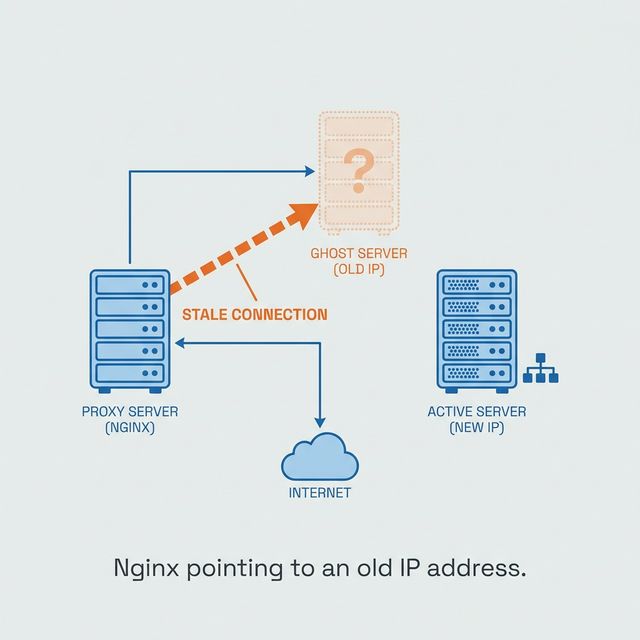
Nginx does not keep asking DNS just because your upstream keeps changing.
That is the trap.
You can point proxy_pass at a hostname, deploy it, watch it work, and still be carrying a production outage in your pocket. The config looks normal. The first request succeeds. The failure arrives later, after the IP behind that hostname changes.
Static Nginx upstream hostnames are fine for static infrastructure. In AWS, Kubernetes, Docker, and most modern systems, names move. IPs churn. If Nginx resolves the name once and keeps the old answer, your proxy is now faithfully sending traffic to the past.
The Config That Looks Correct
This is the kind of reverse proxy config that feels harmless:
# A seemingly harmless configuration
location /api/ {
    proxy_pass http://my-api-service.us-east-1.elb.amazonaws.com/;
}
It works on deploy. Then hours or days later, monitoring starts screaming with 502 Bad Gateway. You restart Nginx. The errors disappear. Then they come back.
Nginx was doing exactly what the config asked.
When Nginx starts or reloads, it parses the static hostname and performs a one-time DNS lookup. The resolved IPs are baked into the in-memory configuration.
In AWS or Kubernetes, those IPs are not sacred. They change during scaling events, deployments, and host failures. Nginx does not automatically care. It keeps proxying to stale addresses.
Reproduce It Or You Do Not Understand It
This failure is easy to hand-wave and hard to trust until you make it fail locally.
Docker Compose gives us the pieces: an Nginx proxy and a backend service whose IP can change on demand.
Our plan:
- Define an Nginx proxy and two backend services,
backend_v1andbackend_v2. - Give both backends the same network alias,
my-backend-service. - Start Nginx proxying to
backend_v1. - Stop
backend_v1and startbackend_v2, simulating an IP change. - Observe Nginx fail to connect to the new service.
The First Test Lied
The first docker-compose.yml looked reasonable:
services:
  nginx_proxy:
    # ...
  backend_v1:
    # ...
    networks:
      my_app_net:
        aliases:
          - my-backend-service
  backend_v2:
    # ...
    networks:
      my_app_net:
        aliases:
          - my-backend-service
# ...
Then we ran the test:
docker compose up -d nginx_proxy backend_v1curl http://localhost:8080-> Success, got response from V1.docker compose stop backend_v1docker compose up -d backend_v2curl http://localhost:8080-> Success! We got a response from V2.
The test failed to fail.
That was useful. Docker had reused the old IP address. When backend_v1 stopped, its IP returned to the pool. When backend_v2 started moments later, Docker’s IPAM handed it the same address.
Nginx’s stale cache was accidentally correct.
That kind of false positive is dangerous. It makes a broken test look like a fixed system.
Make the Failure Deterministic
To prove the bug, the IP must change. Static IPs make the test honest.
Here is our final, robust docker-compose.yml:
# ngix/docker-compose.yml
services:
  nginx_proxy:
    image: nginx:1.23-alpine
    container_name: nginx_proxy
    ports:
      - "8080:80"
    volumes:
      - ./nginx/nginx.conf:/etc/nginx/nginx.conf:ro
    networks:
      - my_app_net

  backend_v1:
    image: python:3.9-alpine
    container_name: backend_v1
    command: >
      sh -c "echo '<h1>Response from Backend V1 at 172.20.0.10</h1>' > index.html && python -m http.server 8000"
    networks:
      my_app_net:
        aliases:
          - my-backend-service
        ipv4_address: 172.20.0.10

  backend_v2:
    image: python:3.9-alpine
    container_name: backend_v2
    command: >
      sh -c "echo '<h1>Response from Backend V2 at 172.20.0.11</h1>' > index.html && python -m http.server 8000"
    networks:
      my_app_net:
        aliases:
          - my-backend-service
        ipv4_address: 172.20.0.11

networks:
  my_app_net:
    driver: bridge
    ipam:
      config:
        - subnet: 172.20.0.0/24
With this in place, we use our problematic nginx.conf:
# ngix/nginx/nginx.conf
events { worker_connections 1024; }
http {
    server {
        listen 80;
        location / {
            proxy_pass http://my-backend-service:8000;
            proxy_set_header Host $host;
        }
    }
}
Now the simulation has no ambiguity:
# Start Nginx and V1. Nginx resolves my-backend-service to 172.20.0.10.
$ docker compose up -d nginx_proxy backend_v1

# Test the connection. It works.
$ curl http://localhost:8080
<h1>Response from Backend V1 at 172.20.0.10</h1>

# Simulate the IP change. The service is now at 172.20.0.11.
$ docker compose stop backend_v1
$ docker compose up -d backend_v2

# Test again. Failure is now guaranteed.
$ curl http://localhost:8080
<html>
<head><title>502 Bad Gateway</title></head>
<body>
<center><h1>502 Bad Gateway</h1></center>
<hr><center>nginx/1.23.4</center>
</body>
</html>
Now we have the real failure. Nginx is stuck sending traffic to .10, even though the service lives at .11.
Force Runtime Resolution
The fix has two parts:
The
resolverDirective: This tells Nginx which DNS server to use for runtime queries. Nginx uses its own non-blocking resolver, so these lookups do not stall the event loop. In Docker, the internal resolver is127.0.0.11. Thevalidparameter controls the cache TTL.Using a Variable: A variable in
proxy_passtells Nginx the value can change. That forces runtime resolution instead of a one-time startup lookup.
Here is the corrected nginx.good.conf:
# ngix/nginx/nginx.good.conf
events { worker_connections 1024; }
http {
    server {
        listen 80;

        # 1. Define the resolver and a short cache lifetime.
        resolver 127.0.0.11 valid=5s;

        # 2. Store the upstream in a variable.
        set $backend "my-backend-service:8000";

        location / {
            # 3. Use the variable to force runtime resolution.
            proxy_pass http://$backend;
            proxy_set_header Host $host;
        }
    }
}
After reloading Nginx with this configuration (docker compose exec nginx_proxy nginx -s reload), the test behaves correctly. Switch from backend_v1 to backend_v2, wait for the valid=5s cache to expire, and the next curl succeeds.
Nginx re-resolves the hostname, discovers 172.20.0.11, and sends traffic to the live backend.
The Rule
The default behavior is fine for static infrastructure. In dynamic infrastructure, it can be a liability.
The rule is simple: if your proxy_pass points to a hostname whose IP can change, use resolver with a variable.
Do not rely on restarts. Do not rely on luck. Make Nginx resolve the world it is actually running in.
For a deeper catalog of related mistakes, the old nginx proxy pitfalls repo is still worth reading.