
Shipping Piper as a Cross-Platform Local TTS Runtime
A practical design for packaging Piper, wrapping its CLI, and testing local speech synthesis across Windows, macOS, and Linux.

On this page
Getting Piper to produce a WAV file is the easy part. Shipping it inside a desktop application means defining everything around that command: which runtime and voice are present, how the app invokes them, where generated audio goes, what can be logged, and how a failed synthesis is diagnosed.
The first milestone I would aim for is deliberately narrow:
Given text and a voice ID, produce a valid WAV file locally through a cancellable process with a useful result or error.
This is not yet a complete speech subsystem. It is a reliable boundary that the rest of the application can build on.
Pin the Piper Distribution First
There are two Piper repositories that are easy to confuse. The original rhasspy/piper repository is archived; current development and releases live under OHF-Voice/piper1-gpl
. The maintained project is licensed under GPL-3.0 and embeds eSpeak NG for phonemization.
Those details affect packaging. Before writing the adapter, choose a specific Piper release and decide how its runtime will be distributed on each target platform. Do not develop against an unpinned pip install and assume the same command and dependencies will appear in the desktop package later.
The voice is a separate artifact with its own license. Record the source and license for every model you distribute; including Piper’s license does not account for the voice automatically. If the application will be distributed, review the GPL obligations and each model’s terms as part of the release design, not after the bundle is assembled.
For a development check, the current Piper CLI documentation uses this shape:
python3 -m piper \
  -m en_US-lessac-medium \
  -f test.wav \
  -- 'The backup completed successfully.'
That command proves the selected package and voice work. The application should still invoke a pinned, packaged runtime rather than depend on the user’s Python installation.
Treat the Runtime and Voice as One Bundle
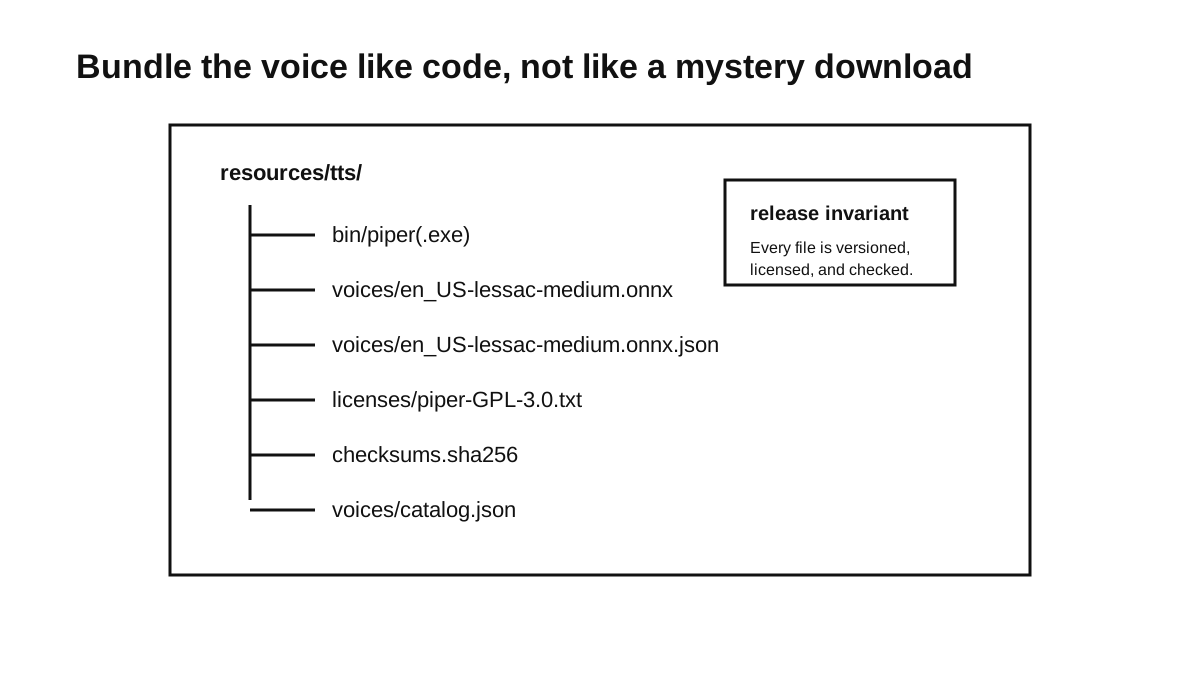
I prefer a bundle whose contents can be identified without starting the application:
resources/
  tts/
    runtime/
      windows-x64/
      macos-arm64/
      linux-x64/
    voices/
      en_US-lessac-medium.onnx
      en_US-lessac-medium.onnx.json
    licenses/
      piper-GPL-3.0.txt
      en_US-lessac-medium.txt
    checksums.sha256
    catalog.json
The runtime directories may contain a launcher, Python runtime, native libraries, and eSpeak data, depending on the Piper release and packaging method. The important property is that the bundle is complete: installation must not fetch an undeclared dependency from the host machine.
Checksums answer a different question from versions. A version says what should have been installed; a checksum tells the application whether the file it is about to use is the expected file. Verify the runtime and model artifacts after installation or update, before passing them to Piper.
The companion JSON file matters too. A Piper voice consists of the ONNX model and its matching .onnx.json configuration. Updating one without the other should fail validation rather than produce an obscure synthesis error.
Make the Voice Catalog the Application Contract
Application code should resolve a voice ID through a catalog instead of constructing paths in several places:
{
  "runtime": {
    "engine": "piper",
    "version": "replace-with-pinned-version"
  },
  "voices": [
    {
      "id": "en-us-lessac-medium",
      "name": "English US — Lessac Medium",
      "language": "en-US",
      "model": "voices/en_US-lessac-medium.onnx",
      "config": "voices/en_US-lessac-medium.onnx.json",
      "license": "licenses/en_US-lessac-medium.txt",
      "source": "replace-with-model-source",
      "sha256": {
        "model": "replace-with-real-checksum",
        "config": "replace-with-real-checksum"
      }
    }
  ]
}
Only put measured or verified properties in this file. Quality notes, pronunciation limitations, and recommended chunk sizes can be useful, but they should come from listening tests for that exact model rather than assumptions about the language or quality label.
The catalog becomes the boundary between packaging and synthesis. The application asks for en-us-lessac-medium; the adapter resolves the files and knows which Piper runtime accepts them.
Keep the First Runtime Path Linear
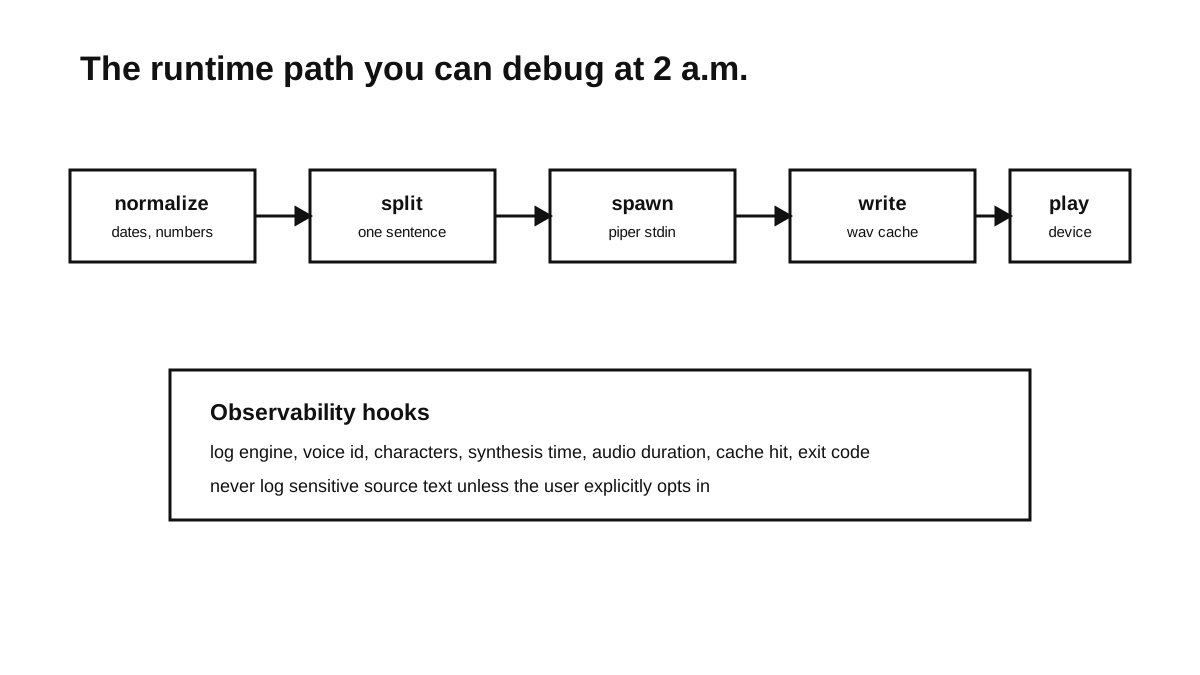
A first implementation can stay sequential:
- Resolve and validate the requested voice bundle.
- Normalize only the text forms the product has explicitly decided to handle.
- Write the input to a private temporary file.
- Run Piper and write to a temporary WAV path.
- Validate the WAV, then atomically move it into the cache or requested destination.
- Delete the input and partial output on success, error, or cancellation.
Writing directly to the final output path risks leaving a truncated file that looks like a cache hit after a crash. A temporary file plus atomic rename gives the caller a simpler promise: the final path either contains a completed result or does not exist.
At the application edge, the contract can remain independent of Piper:
type SynthesisRequest = {
  text: string;
  voiceId: string;
  outputPath: string;
  signal?: AbortSignal;
};

type SynthesisResult = {
  outputPath: string;
  engine: "piper";
  engineVersion: string;
  voiceId: string;
  characters: number;
  synthesisMs: number;
  audioMs?: number;
};
The adapter owns the Piper command, model location, temporary files, and process lifecycle. Callers should not need to know whether a later implementation uses the CLI, a long-running service, or a native API.
Build the Invocation for the Pinned Version
The maintained Piper CLI supports --input-file, which avoids putting private text in a shell command or process argument list. For the Python-packaged CLI, an invocation builder could produce arguments like these:
const args = [
  "-m", "piper",
  "-m", voiceName,
  "--data-dir", voicesDir,
  "-f", temporaryOutputPath,
  "--input-file", privateInputPath
];

const child = spawn(pythonPath, args, {
  shell: false,
  stdio: ["ignore", "ignore", "pipe"],
  windowsHide: true
});
Use the exact flags supported by the release in the bundle and cover that command with an integration test. Piper’s command-line interface has changed between distributions, so an example copied from an older release is not a stable product contract.
shell: false and an argument array avoid shell interpolation and handle spaces in paths. They do not remove the need to validate paths: resolve bundle paths against the expected root and reject catalog entries that escape it.
Cancellation also needs an explicit policy. Connect the request’s AbortSignal to the child process, wait for it to exit, and remove the temporary files. If graceful termination does not complete within a short, defined interval, escalate to the platform-appropriate forced termination. On Windows, remember that terminating a parent does not necessarily clean up every descendant process.
Capture stderr, but cap how much is retained. A failed job should report the exit code, signal, engine version, voice ID, elapsed time, and a bounded diagnostic message. It should not include the input text by default.
Cache the Inputs That Define the Audio
A cache is useful for repeated interface prompts, but its key must include every setting that can change the waveform:
cache_key = sha256(
  engine_version +
  model_checksum +
  config_checksum +
  normalized_text +
  speaking_rate +
  noise_settings +
  volume
)
The voice ID alone is not enough because a model can be replaced without changing its friendly name. A model checksum makes that replacement visible to the cache.
Normalized text belongs in the key only if normalization is deterministic and versioned. If the normalization rules change, include their version as well or invalidate the old cache. Store cached audio in the operating system’s application-data or cache directory, not beside a read-only application bundle.
Local synthesis keeps text away from a remote TTS provider, but careless logs and temporary files can give that privacy back. Restrict permissions on text files, remove them on every exit path, and decide whether cached audio is sensitive for the product’s use case.
Test the Platform Edges Early
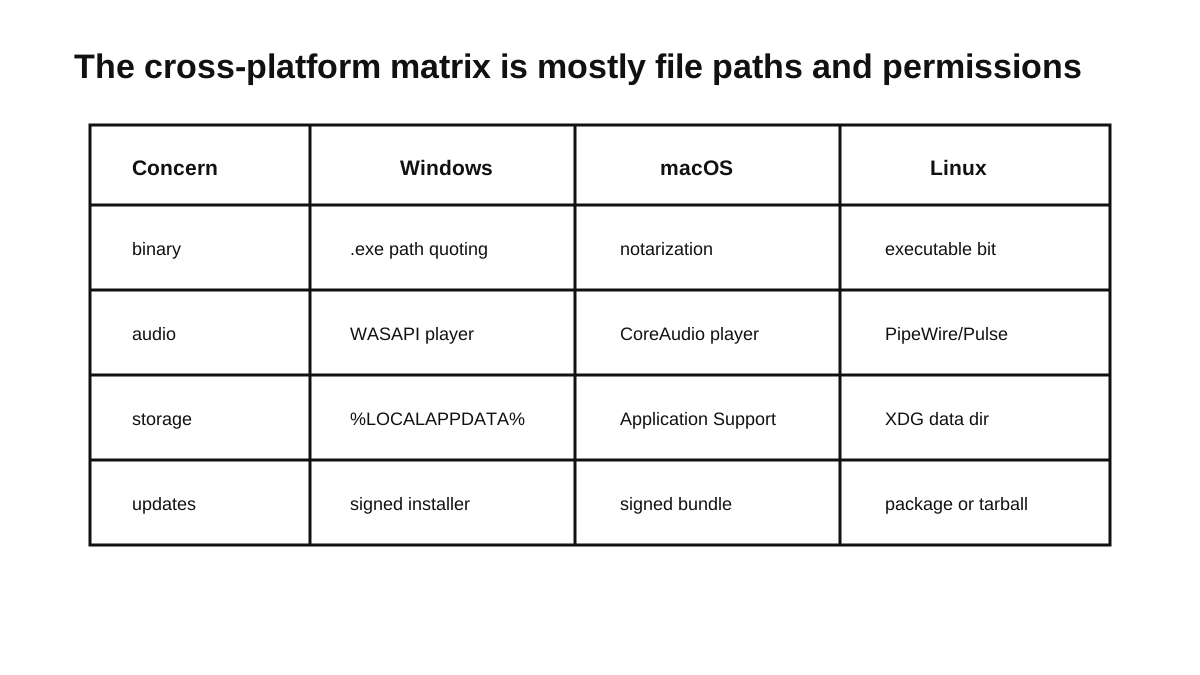
The synthesis logic may be identical across platforms; packaging and process behaviour are not.
- Windows: Test a username and installation path containing spaces and non-ASCII characters. Keep the subprocess window hidden, use the application-data directory for writable files, and verify cancellation does not leave child processes behind.
- macOS: Preserve executable permissions, include every required architecture, and incorporate signing and notarization into the packaging test. Put writable state under the user’s Library directories rather than the application bundle.
- Linux: Preserve executable permissions and test inside the actual AppImage, Flatpak, Snap, or distribution package. Use XDG directories for writable data and check the sandbox rules that apply to subprocesses and audio playback.
On all three, run from a read-only installation directory and synthesize through paths containing both spaces and Unicode. Those cases test the boundary more usefully than another run from a developer checkout.
Measure the Boundary You Built
For each synthesis, record enough metadata to distinguish startup, generation, and output failures:
- subprocess startup and total synthesis time;
- engine version, voice ID, and model checksum;
- input character count, but not the input itself;
- output byte length and decoded audio duration;
- exit code or signal and a bounded
stderrexcerpt; - cache hit or miss; and
- cancellation request-to-exit time.
Real-time factor is a useful comparison when complete audio is generated before playback:
real_time_factor = synthesis_duration_ms / audio_duration_ms
Generating ten seconds of audio in 500 ms gives an RTF of 0.05; taking fourteen seconds gives 1.4. Whether either result is acceptable depends on the interaction. A batch export and a spoken button response have different latency budgets, so keep time to first playable audio separate if the implementation later adds streaming.
The official Piper documentation notes that loading the model for every CLI call can be slow and recommends its web server for repeated use. That is a reason to measure subprocess startup, not a reason to add a resident service immediately. If startup dominates the workloads that matter, the adapter boundary allows the implementation to change without changing every caller.
Keep One End-to-End Smoke Test
The first automated test should exercise the packaged artifact rather than a globally installed Piper:
Given the bundled en-us-lessac-medium voice
When the adapter synthesizes "The backup completed successfully."
Then the process exits successfully
And the final output exists
And the temporary input and output do not exist
And the file starts with a RIFF/WAVE header
And an audio decoder can read a positive duration
Run that test once per packaged platform and architecture. A separate human listening sentence can cover numbers, abbreviations, and pacing, but it should be treated as a repeatable review sample rather than an automated claim about voice quality.
Once this path survives installation, synthesis, cancellation, and cleanup on each target platform, there is a dependable seam for the next decision: keep paying the CLI startup cost, run Piper as a resident local service, or replace the adapter internals with another engine. That decision can then be based on measured workloads instead of the convenience of the first demo.
Series
Local Cross-Platform TTS
- 01 A Field Guide to Shipping Local TTS Across Platforms
- 02 Shipping Piper as a Cross-Platform Local TTS Runtime Current note
- 03 Designing a Stable API for Local Text-to-Speech
- 04 Testing Local TTS: Pronunciation, Latency, and Release Gates
- 05 Building Dream TTS Around Durable Local Speech Jobs

Software Engineering