
Finding an 800ms Token Callout in a Gravitee API Gateway
A service token lived for more than ten hours, but our Gravitee gateway fetched it on every request. Here is how we measured the delay, tested the obvious cache fix, and found the constraint that shaped the workaround.
On this page
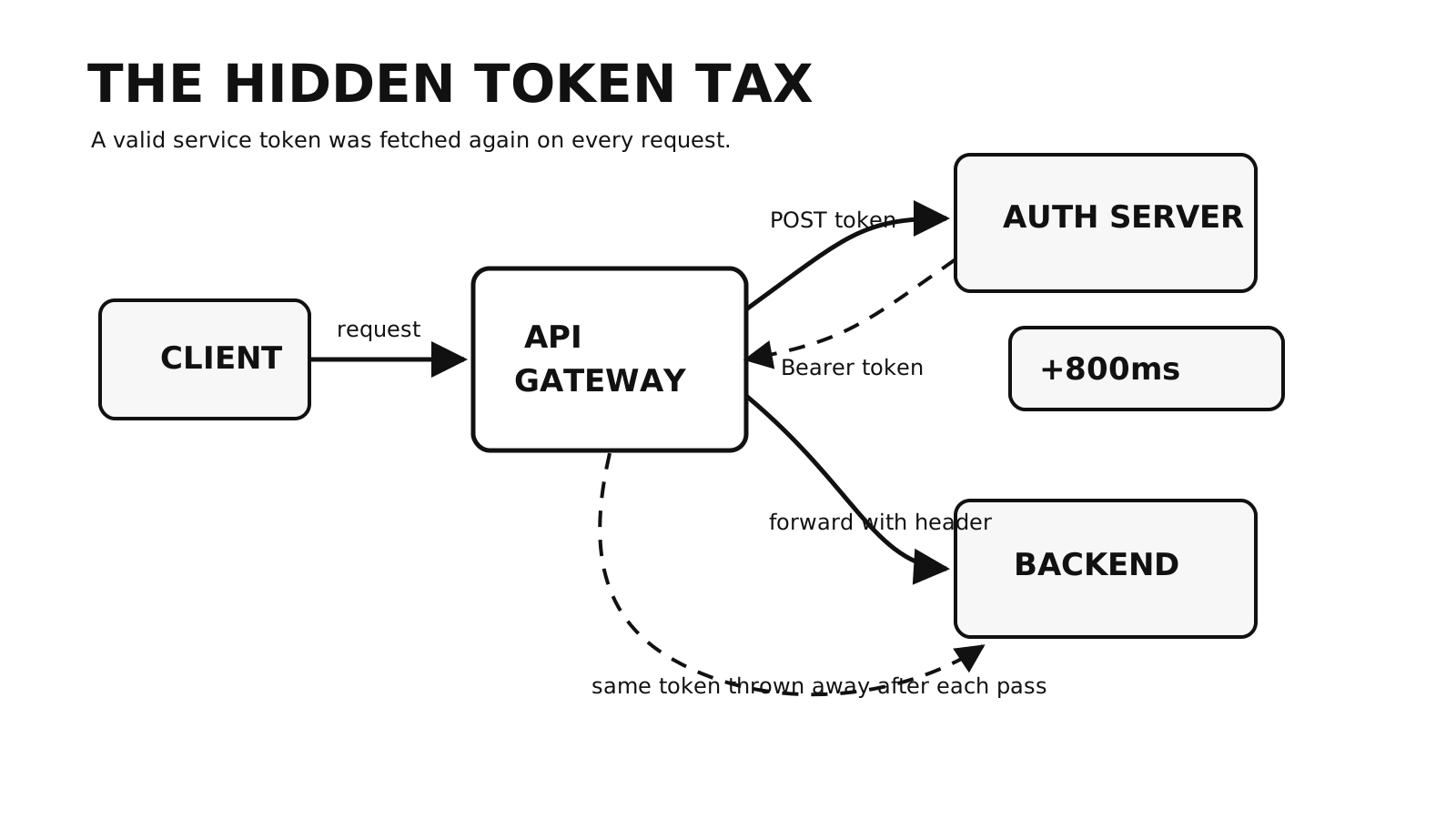
One of our Gravitee routes was correct and slow.
It accepted the client request, obtained a valid service token, attached the right Authorization header, and forwarded the request to the backend. Nothing failed, and the dashboards remained green. But each request also waited roughly 800ms while the gateway fetched a token it had already fetched for the previous request.
The token was valid for more than ten hours. Our policy chain treated it as disposable.
That mismatch was the useful clue: the route did not have an authentication failure. It had repeated authentication work on its hot path.
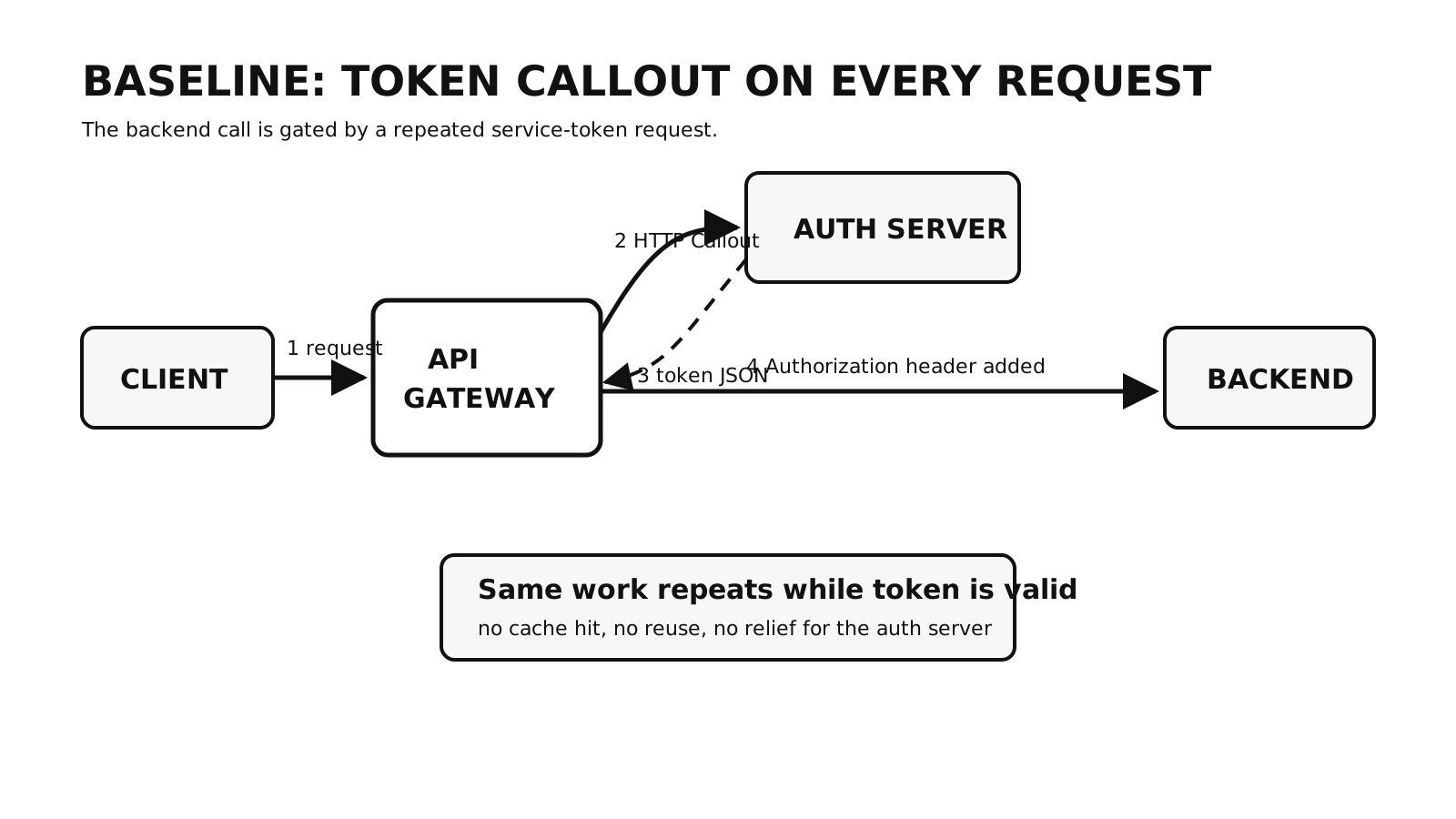
What the gateway repeated
Our route dealt with two separate authorization steps:
- The client authenticated to the API.
- The gateway authenticated to the backend with a service credential.
For the second step, an HTTP Callout policy requested a bearer token from our authorization server. A response had this shape:
{
  "access_token": "<redacted>",
  "refresh_token": "<redacted>",
  "scope": "read write",
  "token_type": "Bearer",
  "expires_in": 38399
}
The expires_in value was 38,399 seconds, or about 10 hours and 40 minutes. Yet every incoming request ran the same sequence:
- Call the authorization server.
- Parse
access_tokenfrom the response. - Set
Authorization: Bearer <token>on the upstream request. - Forward the request to the backend.
- Discard the token when request processing ended.
That sequence can look harmless at low traffic. It still adds the authorization server’s latency and availability to every request, even while a reusable token remains valid.
Measure the repeated work first
I would not start by rearranging policies. First establish where the time goes.
From the client boundary, curl can separate some of the request phases and report time to first byte (TTFB):
curl -s -o /dev/null \
  -w "dns=%{time_namelookup} connect=%{time_connect} tls=%{time_appconnect} ttfb=%{time_starttransfer} total=%{time_total}\n" \
  https://api.example.com/some-route
TTFB is not a gateway-only measurement. It includes the work between the client and the first response byte, which is why I would compare several views of the same route:
- repeated gateway requests close together;
- the authorization server’s response time;
- the backend directly, if there is a safe way to bypass the gateway;
- the gateway route with the callout disabled in a controlled test.
Use several samples rather than treating one request as a benchmark. The immediate question is narrower than “is the gateway slow?”:
Is this callout producing request-specific work, or repeating work whose result is still valid?
In our case, the callout took around 800ms. Requests made close together received the same token, and its stated lifetime was far longer than the interval between requests. That was enough to investigate reuse, but token equality alone is not a safety argument. Scope, audience, credential identity, expiry, and revocation behaviour still determine whether two requests may share a token.
The cache design we expected to build
The intended control flow was small:
Look up the service token
  -> hit: attach it to the upstream request
  -> miss: fetch it, store it, then attach it
In policy terms, we expected this sequence:
| Step | Policy | Purpose |
|---|---|---|
| 1 | Cache lookup | Read a token under a stable key for the service credential. |
| 2 | HTTP Callout | Fetch a token only after a cache miss. |
| 3 | Cache store | Save the token with a lifetime shorter than its usable lifetime. |
| 4 | Transform Headers | Add the bearer token to the upstream request. |
We planned to condition the HTTP Callout on the absence of a context attribute:
{#context.attributes['access_token'] == null}
The expression was not the problem. Our assumption about the Cache policy was.
Gravitee’s Cache policy solved a different problem
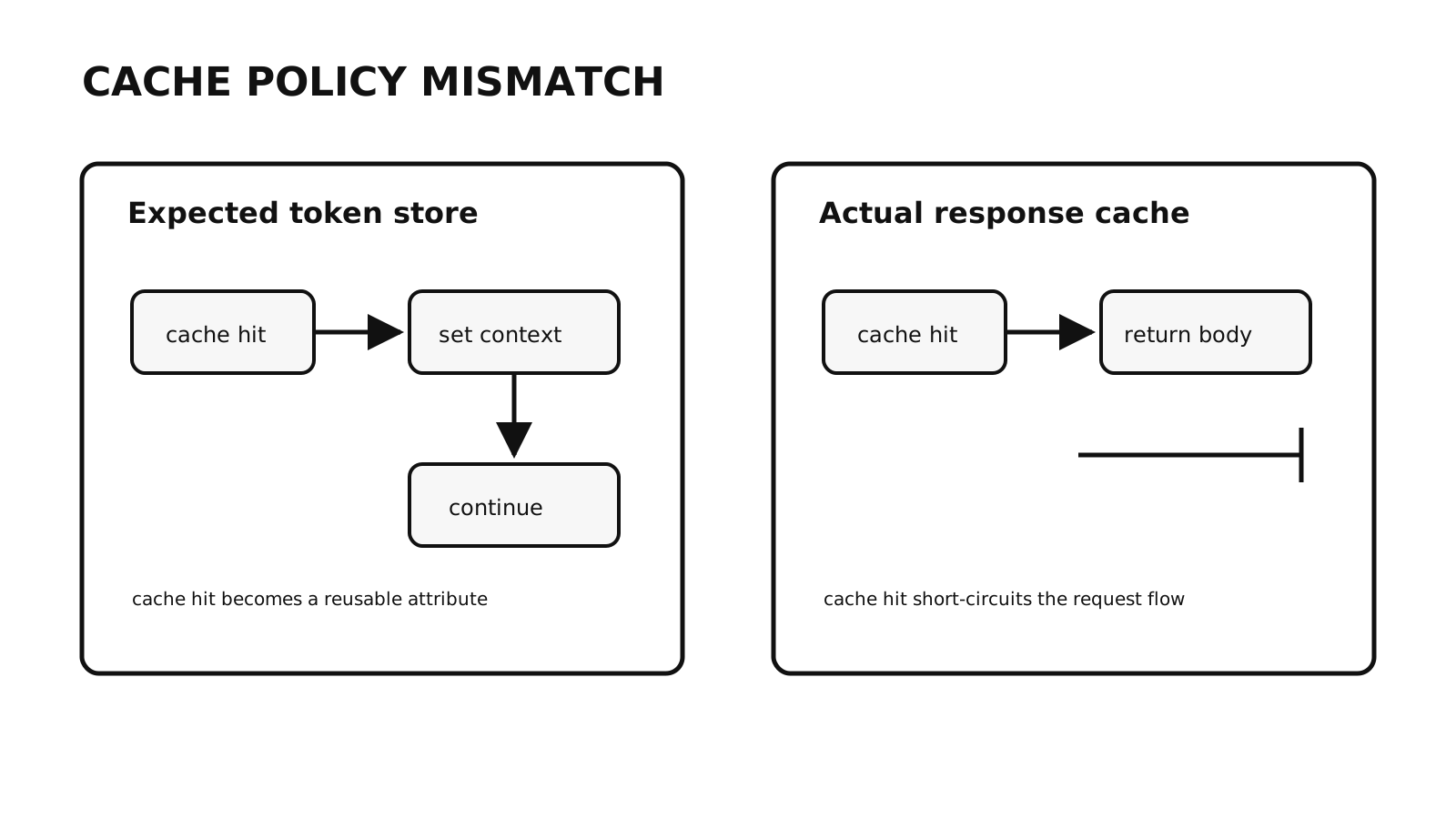
The Cache policy available in our Gravitee 3.x setup was a response cache, not a general-purpose key-value interface for policy data. Gravitee’s Cache policy documentation describes caching upstream content, status, and headers so a later request can avoid the backend call.
That gives response caching this control flow:
cache hit -> return the cached upstream response
cache miss -> call the upstream and cache its response
We needed something different:
cache hit -> put one value in context -> continue the request policy chain
The distinction matters. A cached service token is intermediate policy data; it is not the response that the API should send to its caller. We had approached a response shortcut as though it were a storage primitive.
Newer Gravitee installations may have a direct option. The Data Cache policy documentation describes get, set, and expire operations for arbitrary key-value pairs and includes an OAuth-token caching example. Check the policy’s compatibility with your APIM version and API definition before borrowing the workaround from this series.
The Groovy sandbox ruled out hidden state
Once the Cache policy proved unsuitable, we tried to reach the cache resource from Groovy:
def cache = context.getComponent('authTokens')
def cachedToken = cache.get('auth_token_general')

if (cachedToken != null) {
    request.headers.set('Authorization', "Bearer ${cachedToken}")
} else {
    // Fetch, store, and attach a token.
}
The gateway rejected the component lookup:
{
  "message": "Failed to resolve method [ class io.gravitee.policy.groovy.utils.AttributesBasedExecutionContext getComponent java.lang.String ]",
  "http_status_code": 500
}
The script saw Gravitee’s restricted execution-context wrapper, not an unrestricted gateway context.
We also tried keeping the value in static fields:
@groovy.transform.Field static String cachedToken = null
@groovy.transform.Field static long tokenExpiresAt = 0L
The sandbox blocked that annotation. A JVM-system-property attempt was blocked as well.
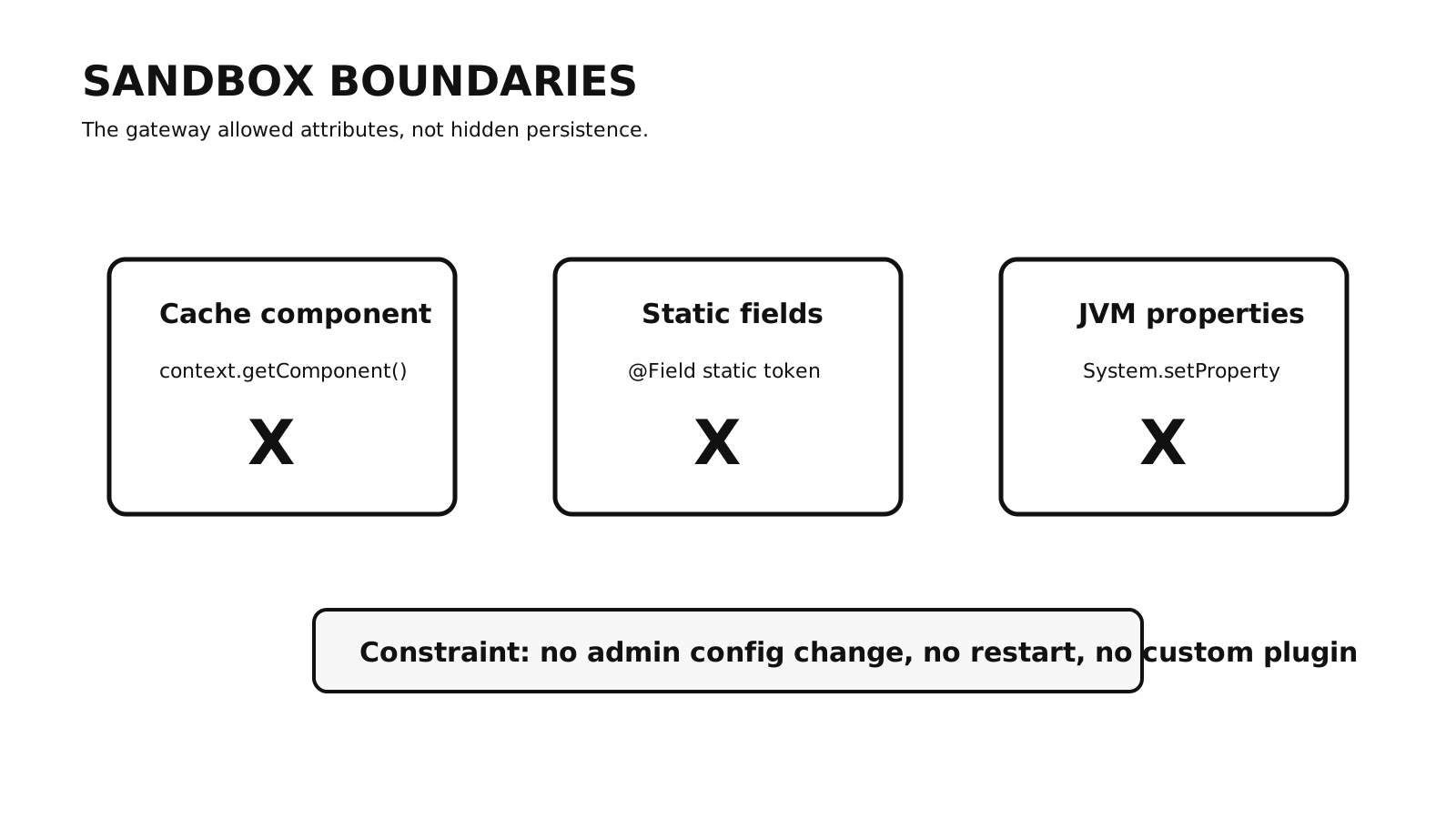
These failures were constraints, not evidence that the sandbox was badly designed. Code on a shared request path should not gain filesystem, JVM, or mutable process-wide access casually. Loosening the sandbox or installing a custom plugin would also have moved the change from API configuration into gateway operations, which was outside what our API team could deploy on its own.
The practical requirements were now clear:
- no access to hidden gateway components;
- no persistent state smuggled into Groovy;
- no gateway restart or whitelist change;
- a solution built from policies our team could configure.
Checks to make before caching a service token
Our 800ms observation identified waste; it did not by itself define a safe cache. Before reusing a service token, I would write down these answers:
| Question | Decision it controls |
|---|---|
| What are the token’s expiry and revocation semantics? | The cache lifetime and whether early invalidation is required. |
| Which credential, audience, and scopes produced it? | The cache key and which routes may share the value. |
| Does the issuer return a caller-specific token? | Whether reuse across callers is allowed at all. |
| How far before expiry should the cache refresh? | The safety margin for clock skew and in-flight requests. |
| What happens when several misses arrive together? | Whether the design needs protection from a refresh stampede. |
| What happens when token acquisition fails? | The failure response and how to avoid caching an error. |
| Who may inspect policy context, logs, and cache data? | How the bearer credential is kept out of diagnostics and unauthorized access. |
The safe cache key is rarely just token. It should represent the inputs that change the authorization result. Likewise, a successful HTTP response is not automatically safe to cache: store only a validated token response, for less time than the token remains usable.
The constraint pointed to the workaround
We could not make the existing Cache policy expose an intermediate value, but it was good at returning a cached upstream response. The next step was to make the token response itself the response of a small internal API, then call that API from the original route.
That became the Loopback Pattern covered in the next post. It used the response cache as designed, kept the service token out of improvised Groovy state, and required no gateway restart or custom plugin.
Series
Gravitee API Caching
- 01 Finding an 800ms Token Callout in a Gravitee API Gateway Current note
- 02 Caching Service Tokens with a Gravitee Loopback API
- 03 Caching Service Tokens in Gravitee with a Loopback API